<?xml version="1.0" encoding="utf-8"?><feed xmlns="http://www.w3.org/2005/Atom" xml:lang="en"><generator uri="https://jekyllrb.com/" version="4.3.4">Jekyll</generator><link href="https://aistore.nvidia.com/feed.xml" rel="self" type="application/atom+xml" /><link href="https://aistore.nvidia.com/" rel="alternate" type="text/html" hreflang="en" /><updated>2026-04-29T00:07:36+00:00</updated><id>https://aistore.nvidia.com/feed.xml</id><title type="html">AIStore</title><subtitle>AIStore is a lightweight object storage system with the capability to linearly scale-out with each added storage node and a special focus on petascale deep learning. See more at: github.com/NVIDIA/aistore
</subtitle><author><name>NVIDIA AIStore Team</name></author><entry><title type="html">Eliminating Cluster Authentication Risks: AIStore with RSA and OIDC Issuer Discovery</title><link href="https://aistore.nvidia.com/blog/2026/04/09/rsa-and-oidc" rel="alternate" type="text/html" title="Eliminating Cluster Authentication Risks: AIStore with RSA and OIDC Issuer Discovery" /><published>2026-04-09T00:00:00+00:00</published><updated>2026-04-09T00:00:00+00:00</updated><id>https://aistore.nvidia.com/blog/2026/04/09/rsa-and-oidc</id><content type="html" xml:base="https://aistore.nvidia.com/blog/2026/04/09/rsa-and-oidc"><![CDATA[<p>Back in February 1997, <a href="https://datatracker.ietf.org/doc/html/rfc2104">RFC 2104</a> introduced HMAC as a mechanism for authenticating messages based on a shared secret key.</p>

<p>Symmetric signing algorithms like HMAC <strong>can</strong> be used to securely sign access tokens, but with two extremely important caveats:</p>
<ol>
  <li>The secret key must be strong enough to avoid simple brute-force attacks (high entropy, sufficiently long, and randomly generated)</li>
  <li>The secret key must NEVER be leaked</li>
</ol>

<p>Unfortunately for the first point, <a href="https://hashcat.net/hashcat/">hashcat</a> received its public release in 2009.
Since then, advances in GPU hardware and frameworks like <a href="https://developer.nvidia.com/cuda">NVIDIA CUDA</a> have turned tools such as hashcat into <a href="https://chiomaibeakanma.hashnode.dev/exploiting-weak-jwt-hmac-secrets-from-account-takeover-to-admin-privilege-escalation">increasingly effective</a> brute-force engines, capable of breaking secrets that were once considered safe.
Still, given a sufficiently long and random key, this is <a href="https://specopssoft.com/blog/sha256-hashing-password-cracking/">not a concern</a> with <code class="language-plaintext highlighter-rouge">HMAC-SHA256</code>.</p>

<p>The second issue is a much larger problem for symmetric signing approaches like HMAC.
Since the signing key is also used for validation, it must be provided to the server, not just the token issuer. 
And this secret key must never be accidentally exposed in deployment pipelines, configuration files, or logs.
This increased attack surface is a massive risk!</p>

<p>What’s worse, a compromised signing key gives no indication to server owners. 
With no key rotation, a stolen key can be used to sign tokens with ANY level of access indefinitely. 
Attackers can use this key to quietly read or corrupt sensitive data without revealing their access.
For any AIStore deployments that are not carefully gated in a protected environment, this could spell disaster.</p>

<p>With the 4.3 and subsequent 4.4 releases, AIStore AuthN now supports RSA signing keys and OIDC Issuer Discovery -- two essential features to mitigate the risk of this total security collapse.</p>

<hr />

<h2 id="table-of-contents">Table of Contents</h2>

<ul>
  <li><a href="#rsa-jwt-signing">RSA JWT Signing</a></li>
  <li><a href="#oidc-issuer-discovery">OIDC Issuer Discovery</a>
    <ul>
      <li><a href="#static-key-distribution">Static Key Distribution</a></li>
      <li><a href="#trusted-issuers">Trusted Issuers</a></li>
      <li><a href="#oidc-in-authn">OIDC in AuthN</a></li>
      <li><a href="#drawbacks-and-limitations">Drawbacks and Limitations</a></li>
    </ul>
  </li>
  <li><a href="#complete-kubernetes-deployment">Complete Kubernetes Deployment</a>
    <ul>
      <li><a href="#running-the-deployment">Running the Deployment</a></li>
      <li><a href="#authn-config">AuthN Config</a></li>
      <li><a href="#ais-config">AIS Config</a></li>
    </ul>
  </li>
  <li><a href="#conclusion-and-future-work">Conclusion and Future Work</a>
    <ul>
      <li><a href="#signing-key-rotation">Signing Key Rotation</a></li>
      <li><a href="#multi-replica-support">Multi-replica Support</a></li>
      <li><a href="#service-account-authentication">Service Account Authentication</a></li>
    </ul>
  </li>
  <li><a href="#references">References</a></li>
</ul>

<hr />

<h2 id="rsa-jwt-signing">RSA JWT Signing</h2>

<p>Previously, AIStore AuthN relied on HS256, which uses HMAC-SHA256 with a shared secret key.
This is a symmetric algorithm, where the same secret is used for both signing <a href="https://datatracker.ietf.org/doc/html/rfc7519">JWTs</a> and validating them.</p>

<p>This meant the signing key was distributed and could potentially exist in files, K8s secrets, K8s Pod specs, or environment variables in the actual AIS deployment.</p>

<p>We needed to be able to distribute a key publicly without exposing the ability to sign new tokens.
That’s where <strong>asymmetric</strong> RSA signing key pairs come into the picture. 
With RSA, the private key never leaves the AuthN service. 
JWT signatures are validated only by a public key that cannot be used to sign new tokens.</p>

<p>AuthN also now supports encrypting the private key locally with a passphrase so it’s never unprotected on disk even within the service.</p>

<p>See <a href="https://github.com/NVIDIA/aistore/blob/main/docs/authn.md#rsa-signing">RSA Signing</a> in the AuthN docs for more details.</p>

<hr />

<h2 id="oidc-issuer-discovery">OIDC Issuer Discovery</h2>

<h3 id="static-key-distribution">Static Key Distribution</h3>

<p>Even with the improved security of RSA keys, relying on static key distribution presents challenges.</p>

<p>First, this still doesn’t fully address the issue of compromised keys. 
Private key leaks are less likely, as they are never distributed, but we still risk silent exposure.
Without key rotation, a compromised private key can be used to mint fraudulent JWTs indefinitely.
And by using a static public key in AIS config, we can’t simply rotate the validation key in AIS without invalidating all existing tokens.</p>

<p>The static config also adds friction to deployment, since AuthN generates the key pair. 
Any AIS cluster deployment would need to inject the generated public key into its config.</p>

<h3 id="trusted-issuers">Trusted Issuers</h3>

<p>OIDC issuer lookup solves all of this by validating JWTs with a cached set of keys from trusted issuers. 
Instead of checking a JWT signature with a static public key, AIS uses the <code class="language-plaintext highlighter-rouge">iss</code> and <code class="language-plaintext highlighter-rouge">kid</code> claims from the JWT to look up the associated public key.</p>

<p>AIS itself has supported the concept of <a href="https://github.com/NVIDIA/aistore/blob/main/docs/auth_validation.md#oidc-lookup">OIDC issuer discovery</a> since version 4.1, but this was restricted to 3rd-party JWT issuers, which needed additional configuration to support the custom JWT format for AIS access.</p>

<p>This update brings that functionality to the native AIStore AuthN service, offering much better security and simplified deployment compared to the previous approach of symmetric, static signing keys.</p>

<h3 id="oidc-in-authn">OIDC in AuthN</h3>

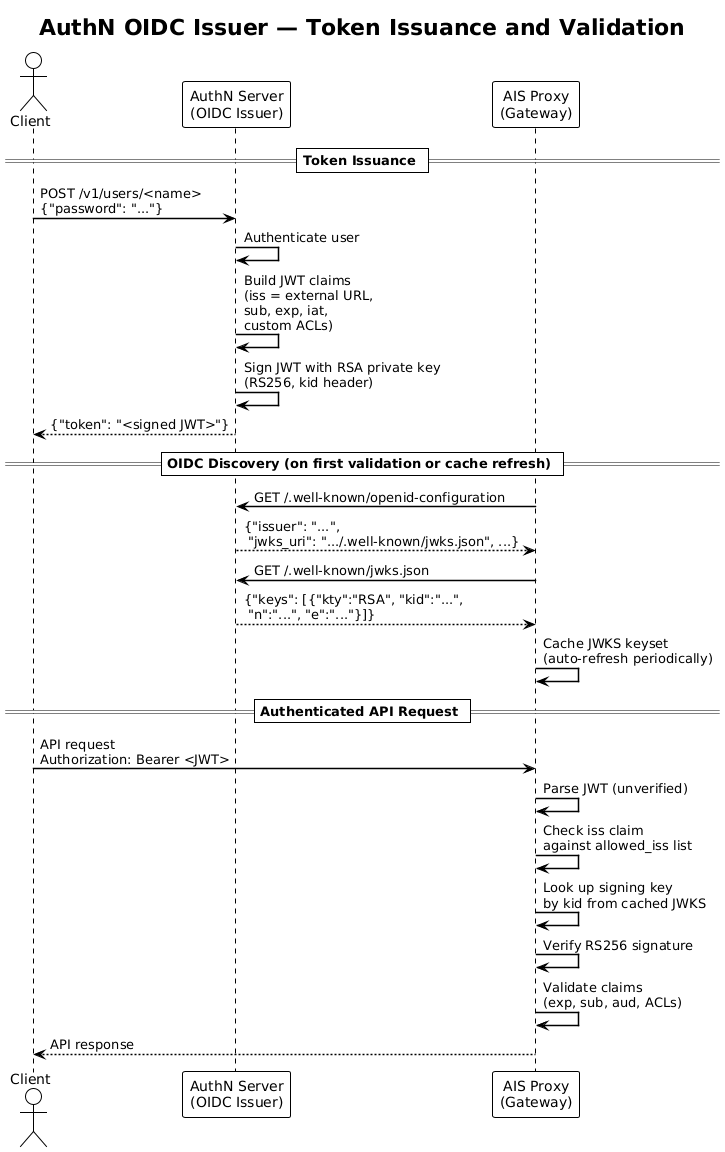
<p>AuthN does NOT fully implement the <a href="https://openid.net/specs/openid-connect-core-1_0.html">OIDC spec</a>. 
It simply exposes the path <code class="language-plaintext highlighter-rouge">/.well-known/openid-configuration</code>, which responds with a “discovery document” containing <code class="language-plaintext highlighter-rouge">jwks_uri</code>. 
That <code class="language-plaintext highlighter-rouge">jwks_uri</code> path then returns the complete set of valid public <a href="https://datatracker.ietf.org/doc/html/rfc7517">JSON Web Keys (JWK)</a>. 
A JWK is a generic JSON container for different key types.
In the case of AuthN, it represents an encoded RSA public key with some extra metadata.</p>

<p>This JWK set (JWKS) is then cached on the AIStore proxies, where the keys are used to validate JWT signatures.</p>

<p>Below is a diagram showing the full flow; see the <a href="https://github.com/NVIDIA/aistore/blob/main/docs/authn.md#oidc-issuer">AuthN docs</a> for more implementation details.</p>

<p><img src="/assets/rsa_and_oidc/OIDC_issuer.png" alt="OIDC Issuer flow" /></p>

<h3 id="drawbacks-and-limitations">Drawbacks and Limitations</h3>

<p>One disadvantage is that previously, AIS had no dependency on the availability of the AuthN service. 
Now, AIS expects AuthN to be reachable for updating the local cache of key sets on a regular basis, increasing the requirement for AuthN reliability.
<a href="https://github.com/NVIDIA/ais-k8s/tree/main/helm/authn">Deploying in K8s</a> simplifies this, but multi-replica support for AuthN requires ongoing work (see <a href="#conclusion-and-future-work">future work</a>).</p>

<p>However, AIS will not need to query AuthN on every request, and in fact caches the key sets intelligently thanks to the <a href="https://github.com/lestrrat-go/jwx">JWX library</a>.</p>

<blockquote>
  <p>Note: AIS currently only refreshes its cached key sets for a specific issuer on proxy restart. 
This is a known deficiency that limits the usability of key rotation and will be fixed in a future release.
See the <a href="#signing-key-rotation">signing key rotation</a> section below.</p>
</blockquote>

<hr />

<h2 id="complete-kubernetes-deployment">Complete Kubernetes Deployment</h2>

<p>With RSA signing and OIDC discovery, the signing key is no longer shared, keys can be rotated without touching AIS config, and AIStore and AuthN can be deployed in any order without pre-distributing keys.</p>

<p>To demonstrate, we’ll show a local AIS cluster deployed in K8s alongside AuthN, runnable in K8s KinD via a single script.</p>

<p>See the full deployment <a href="https://github.com/NVIDIA/ais-k8s/tree/main/local">scripts on the ais-k8s repo</a>.</p>

<h3 id="running-the-deployment">Running the Deployment</h3>

<p>See the <a href="https://github.com/NVIDIA/ais-k8s/blob/main/local/README.md">guide in ais-k8s</a> for full details.
First, you’ll need a few prerequisites:</p>

<ul>
  <li><a href="https://www.docker.com/">Docker</a> or <a href="https://podman.io/">Podman</a></li>
  <li><a href="https://kind.sigs.k8s.io/">Kubernetes in Docker</a></li>
  <li><a href="https://kubernetes.io/docs/reference/kubectl/">kubectl</a></li>
  <li><a href="https://helm.sh/docs/intro/install/">Helm</a></li>
  <li><a href="https://github.com/helmfile/helmfile#installation">Helmfile</a></li>
</ul>

<p>Next, to create the local deployment, clone <a href="https://github.com/NVIDIA/ais-k8s">ais-k8s</a> and navigate to <code class="language-plaintext highlighter-rouge">local</code>.</p>

<p>Then run <code class="language-plaintext highlighter-rouge">./test-cluster.sh --auth</code>.</p>

<p>That’s it! 
The script will bootstrap a local K8s cluster with all dependencies and an entire stack for AIS: K8s operator, AIS cluster, AIS AuthN, and an admin client deployment.</p>

<p>Once deployed, run the following to drop into a shell on the admin client pod inside the cluster:</p>

<div class="language-bash highlighter-rouge"><div class="highlight"><pre class="highlight"><code>kubectl <span class="nb">exec</span> <span class="nt">-it</span> <span class="nt">-n</span> ais deploy/ais-client <span class="nt">--</span> /bin/bash
</code></pre></div></div>

<p>Initially, the AIS CLI won’t have access because AIS is enforcing authentication:</p>

<div class="language-bash highlighter-rouge"><div class="highlight"><pre class="highlight"><code>root@ais-client-7d869f99bf-dp76b:/# ais <span class="nb">ls
</span>Error: token required
</code></pre></div></div>

<p>This pod is pre-configured with environment variables for accessing the AuthN service. 
Run <code class="language-plaintext highlighter-rouge">ais auth login $AIS_AUTHN_USERNAME -p $AIS_AUTHN_PASSWORD</code> to fetch a token. 
Now the client in this pod has full admin access to the local cluster.</p>

<div class="language-bash highlighter-rouge"><div class="highlight"><pre class="highlight"><code>root@ais-client-7d869f99bf-dp76b:/# ais auth login <span class="nv">$AIS_AUTHN_USERNAME</span> <span class="nt">-p</span> <span class="nv">$AIS_AUTHN_PASSWORD</span>
Logged <span class="k">in</span> <span class="o">(</span>/root/.config/ais/cli/auth.token<span class="o">)</span>
<span class="c"># Successful request</span>
root@ais-client-7d869f99bf-dp76b:/# ais <span class="nb">ls
</span>No buckets <span class="k">in </span>the cluster.
</code></pre></div></div>

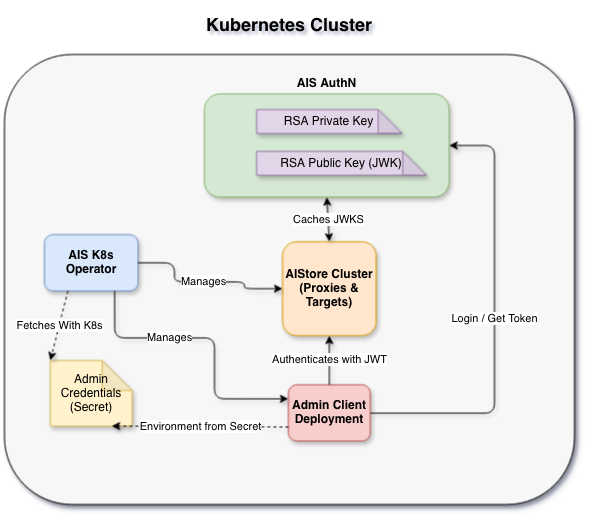
<p>Below is a simplified diagram showing the entire setup:</p>

<p><img src="/assets/rsa_and_oidc/k8s_authn.png" alt="K8s AuthN Deployment" /></p>

<h3 id="authn-config">AuthN Config</h3>

<p>In recent versions of AuthN, RSA is the default signing method and will auto-generate a key pair on initial startup.</p>

<p>The relevant configuration for enabling OIDC lookup in the <a href="https://github.com/NVIDIA/ais-k8s/blob/main/helm/authn/config/authn/local.yaml.gotmpl">AuthN local helm environment</a> is <code class="language-plaintext highlighter-rouge">net.ExternalURL</code>:</p>

<div class="language-yaml highlighter-rouge"><div class="highlight"><pre class="highlight"><code><span class="na">net</span><span class="pi">:</span>
  <span class="na">externalURL</span><span class="pi">:</span> <span class="s2">"</span><span class="s">https://ais-authn.ais.svc.cluster.local:52001"</span>
</code></pre></div></div>

<p>This tells the AuthN service what to use when building the <code class="language-plaintext highlighter-rouge">jwks_uri</code> in the <code class="language-plaintext highlighter-rouge">openid-configuration</code> response.
The URL that clients can use to access the service depends on the deployment, so it must be configured in advance.</p>

<h3 id="ais-config">AIS Config</h3>

<p>Because the AIS cluster runs in the same local deployment, we can use the K8s service DNS to access AuthN directly.</p>

<p>In the <a href="https://github.com/NVIDIA/ais-k8s/blob/main/helm/ais/config/ais/local-auth.yaml">local-auth helm values</a> for AIS, we set <code class="language-plaintext highlighter-rouge">configToUpdate</code> to update the AIS internal configuration to trust JWTs signed by the given allowed issuer.</p>

<p>The <code class="language-plaintext highlighter-rouge">auth</code> section configures how the operator and admin clients connect and provision an admin token by using credentials from a K8s secret.</p>

<div class="language-yaml highlighter-rouge"><div class="highlight"><pre class="highlight"><code><span class="c1"># Configure AIS to trust JWTs issued by the local AuthN issuer</span>
<span class="na">configToUpdate</span><span class="pi">:</span>
  <span class="na">auth</span><span class="pi">:</span>
    <span class="na">enabled</span><span class="pi">:</span> <span class="kc">true</span>
    <span class="c1"># Instead of signature.key, we configure a list of issuers that we trust</span>
    <span class="na">oidc</span><span class="pi">:</span>
      <span class="na">allowed_iss</span><span class="pi">:</span> <span class="pi">[</span><span class="s2">"</span><span class="s">https://ais-authn.ais.svc.cluster.local:52001"</span><span class="pi">]</span>

<span class="c1"># Client AuthN API config used by operator and admin client</span>
<span class="na">auth</span><span class="pi">:</span>
  <span class="na">serviceURL</span><span class="pi">:</span> <span class="s2">"</span><span class="s">https://ais-authn.ais.svc.cluster.local:52001"</span>
  <span class="c1"># Currently, AuthN only supports username and password login to fetch tokens</span>
  <span class="na">usernamePassword</span><span class="pi">:</span>
    <span class="na">secretName</span><span class="pi">:</span> <span class="s">ais-authn-su-creds</span>
</code></pre></div></div>
<hr />

<h2 id="conclusion-and-future-work">Conclusion and Future Work</h2>

<p>Moving towards RSA signing and OIDC issuer lookup is important for AuthN, but there’s more we want to build:</p>

<h3 id="signing-key-rotation">Signing Key Rotation</h3>

<p>Issuer lookup supports multiple active signing keys, which in theory allows for seamless rotation. 
Currently, AuthN keys can be rotated manually via <code class="language-plaintext highlighter-rouge">ais auth rotate-key</code>.
However, AIStore version 4.4 won’t accept tokens signed by the new keys until the cached keyset is refreshed. 
This refresh is only triggered by the previous JWK’s expiry date (currently unset by AuthN) or by a proxy restart.</p>

<p>Once live rotation is fully supported on the AIStore side, automated signing key rotation for AuthN is a natural progression.
Configurable intervals for automated rotation would eliminate the manual step and reduce the window of exposure if a key is compromised.</p>

<h3 id="multi-replica-support">Multi-replica Support</h3>

<p>Since AIS now actively queries AuthN for key sets, a single-replica AuthN becomes a potential availability bottleneck.
Supporting multiple replicas would bring AuthN to production-grade availability.</p>

<p>This is a non-trivial development that requires more than a simple scale-up. 
AuthN currently uses <a href="https://github.com/tidwall/buntdb">BuntDB</a> as its underlying storage. 
Support for distributed DBs will be required for multi-replica access. 
Signing keys must also be distributed and synchronized between instances to support consistency between multiple signers.</p>

<h3 id="service-account-authentication">Service Account Authentication</h3>

<p>A current limitation is that the AIS operator requires K8s secrets for admin credentials to manage AuthN-enabled clusters.
One proposed alternative is to support AuthN token provisioning via a <a href="https://dev.to/piyushjajoo/understanding-kubernetes-projected-service-account-tokens-205f">K8s projected service account token</a>.
This moves the access control used for the operator and admin client deployments to K8s RBAC and away from static credentials.</p>

<p>Follow our progress on the <a href="https://github.com/NVIDIA/aistore">main AIStore repo</a> or try out the <a href="https://github.com/NVIDIA/ais-k8s/tree/main/local">local deployment</a> yourself!</p>

<hr />

<h2 id="references">References</h2>

<p><strong>AIStore Authentication</strong></p>
<ul>
  <li><a href="https://github.com/NVIDIA/aistore/blob/main/docs/authn.md">AuthN Documentation</a></li>
  <li><a href="https://github.com/NVIDIA/aistore/blob/main/docs/auth_validation.md">AIS Auth Validation</a></li>
  <li><a href="https://github.com/NVIDIA/aistore/blob/main/docs/cli/auth.md">AIS Auth CLI</a></li>
  <li><a href="https://github.com/NVIDIA/ais-k8s/tree/main/local">ais-k8s Local Deployment</a></li>
  <li><a href="https://github.com/NVIDIA/ais-k8s/blob/main/docs/authn.md">AuthN in K8s docs</a></li>
  <li><a href="https://github.com/NVIDIA/ais-k8s/tree/main/helm/authn">AuthN in K8s Helm</a></li>
</ul>

<p><strong>Standards and Specs</strong></p>
<ul>
  <li><a href="https://openid.net/specs/openid-connect-core-1_0.html">OpenID Connect Core 1.0</a></li>
  <li><a href="https://openid.net/specs/openid-connect-discovery-1_0.html">OpenID Connect Discovery 1.0</a></li>
  <li><a href="https://datatracker.ietf.org/doc/html/rfc2104">HMAC (RFC 2104)</a></li>
  <li><a href="https://datatracker.ietf.org/doc/html/rfc7519">JSON Web Token (RFC 7519)</a></li>
  <li><a href="https://datatracker.ietf.org/doc/html/rfc7517">JSON Web Key (RFC 7517)</a></li>
  <li><a href="https://datatracker.ietf.org/doc/html/rfc7518#section-3.3">JSON Web Algorithms (RFC 7518) -- RSA</a></li>
</ul>

<p><strong>Libraries and Tools</strong></p>
<ul>
  <li>AIStore JWK caching library: <a href="https://github.com/lestrrat-go/jwx">lestrrat-go/jwx</a></li>
  <li><a href="https://kind.sigs.k8s.io/">Kubernetes in Docker (KinD)</a></li>
  <li>AuthN storage: <a href="https://github.com/tidwall/buntdb">BuntDB</a></li>
</ul>

<p><strong>General</strong></p>
<ul>
  <li><a href="https://github.com/NVIDIA/aistore">AIStore GitHub</a></li>
  <li><a href="https://aistore.nvidia.com/blog">AIStore Blog</a></li>
</ul>]]></content><author><name>Aaron Wilson</name></author><category term="aistore" /><category term="authn" /><category term="security" /><category term="authentication" /><summary type="html"><![CDATA[Back in February 1997, RFC 2104 introduced HMAC as a mechanism for authenticating messages based on a shared secret key.]]></summary></entry><entry><title type="html">Native Bucket Inventory: Up to 17x Faster Remote Bucket Listing</title><link href="https://aistore.nvidia.com/blog/2026/04/06/native-bucket-inventory" rel="alternate" type="text/html" title="Native Bucket Inventory: Up to 17x Faster Remote Bucket Listing" /><published>2026-04-06T00:00:00+00:00</published><updated>2026-04-06T00:00:00+00:00</updated><id>https://aistore.nvidia.com/blog/2026/04/06/native-bucket-inventory</id><content type="html" xml:base="https://aistore.nvidia.com/blog/2026/04/06/native-bucket-inventory"><![CDATA[<p>AIStore 4.3 introduces Native Bucket Inventory (NBI), a new mechanism for accelerating large remote-bucket listings by turning a repeatedly expensive operation into a local, reusable metadata path. Instead of traversing a remote bucket on every <code class="language-plaintext highlighter-rouge">ais ls</code>, AIS can precompute the bucket inventory once, persist it as compact binary chunks in the cluster, and answer subsequent listing requests directly from that local snapshot.</p>

<p>In our benchmarks, NBI delivers roughly <strong>15x to 17x speedup</strong> for repeated listing of an <code class="language-plaintext highlighter-rouge">s3://</code> bucket with 3.2 million objects, highlighting how effective a precomputed local snapshot can be for large datasets. In this post, we walk through the design of NBI, the internal create and list workflows, the benchmark results, and how to use it from the AIStore Python SDK and CLI.</p>

<h3 id="table-of-contents">Table of Contents</h3>

<ul>
  <li><a href="#motivation">Motivation</a></li>
  <li><a href="#workflow">Workflow</a></li>
  <li><a href="#usage">Usage</a></li>
  <li><a href="#benchmark">Benchmark</a></li>
  <li><a href="#current-limitations">Current Limitations</a></li>
  <li><a href="#when-to-use-nbi-and-when-not-to">When to Use NBI (and When Not To)</a></li>
  <li><a href="#conclusion">Conclusion</a></li>
  <li><a href="#references">References</a></li>
</ul>

<h2 id="motivation">Motivation</h2>

<p>Remote bucket listing becomes expensive when the bucket is both large and repeatedly accessed. A full listing requires AIS to retrieve and assemble a large volume of object metadata from the backend before it can return a complete result to the client. When that bucket is relatively stable and listed again and again, the system ends up redoing essentially the same work each time, even though the contents change very little between requests.</p>

<p>The core issue is that the object metadata returned by listing is often reusable, but the system keeps rebuilding it from scratch. The larger the bucket, the more bandwidth, latency, and backend API work AIS must spend to reconstruct information it has effectively already seen.</p>

<p>NBI addresses that mismatch by treating the bucket listing results as cacheable metadata. Instead of rebuilding the full listing on every request, AIS captures it once, stores it locally in a compact form, and reuses that snapshot for subsequent listings.</p>

<blockquote>
  <p>While our benchmarks use S3, NBI is backend-agnostic and works identically with any remote backend — AWS S3, Google Cloud Storage, Azure Blob, OCI Object Storage, and remote AIS clusters.</p>
</blockquote>

<h2 id="workflow">Workflow</h2>

<p>NBI runs in two phases: <strong>creation</strong> and <strong>listing</strong>.</p>

<h3 id="creation">Creation</h3>

<p>When the user requests inventory creation, the <a href="https://github.com/NVIDIA/aistore/blob/main/docs/terminology.md#proxy">proxy</a> distributes the job to all <a href="https://github.com/NVIDIA/aistore/blob/main/docs/terminology.md#target">targets</a>. Each target independently walks the <a href="https://github.com/NVIDIA/aistore/blob/main/docs/providers.md">remote backend</a>, but only keeps the entries whose names hash to that target. The entries are sorted, grouped into chunks of ~20K names each, encoded as compressed <code class="language-plaintext highlighter-rouge">msgpack</code>, and written to the AIS system bucket <code class="language-plaintext highlighter-rouge">ais://.sys-inventory</code>. The resulting object path follows the pattern <code class="language-plaintext highlighter-rouge">{provider}/@#/{bucket}/inv-{uuid}</code>.</p>

<h3 id="listing">Listing</h3>

<p>When a list request carries the inventory flag, the proxy broadcasts to all targets instead of sending the request to the remote backend. Each target reads its local inventory chunks, binary-searches for the continuation token, and returns a page of entries. The proxy merges per-target pages to assemble a globally sorted result. No S3 calls are made.</p>

<h2 id="usage">Usage</h2>

<h3 id="python-sdk">Python SDK</h3>

<div class="language-python highlighter-rouge"><div class="highlight"><pre class="highlight"><code><span class="kn">from</span> <span class="n">aistore</span> <span class="kn">import</span> <span class="n">Client</span>

<span class="n">client</span> <span class="o">=</span> <span class="nc">Client</span><span class="p">(</span><span class="sh">"</span><span class="s">http://ais-endpoint:51080</span><span class="sh">"</span><span class="p">)</span>
<span class="n">bck</span> <span class="o">=</span> <span class="n">client</span><span class="p">.</span><span class="nf">bucket</span><span class="p">(</span><span class="sh">"</span><span class="s">my-bucket</span><span class="sh">"</span><span class="p">,</span> <span class="n">provider</span><span class="o">=</span><span class="sh">"</span><span class="s">s3</span><span class="sh">"</span><span class="p">)</span>

<span class="c1"># Create the inventory (one time)
</span><span class="n">job_id</span> <span class="o">=</span> <span class="n">bck</span><span class="p">.</span><span class="nf">create_inventory</span><span class="p">(</span><span class="n">name</span><span class="o">=</span><span class="sh">"</span><span class="s">trainset-v1</span><span class="sh">"</span><span class="p">,</span> <span class="n">prefix</span><span class="o">=</span><span class="sh">"</span><span class="s">images/</span><span class="sh">"</span><span class="p">)</span>
<span class="n">client</span><span class="p">.</span><span class="nf">job</span><span class="p">(</span><span class="n">job_id</span><span class="p">).</span><span class="nf">wait</span><span class="p">()</span>

<span class="c1"># List via inventory — no S3 calls made
</span><span class="n">page</span> <span class="o">=</span> <span class="n">bck</span><span class="p">.</span><span class="nf">list_objects</span><span class="p">(</span><span class="n">inventory_name</span><span class="o">=</span><span class="sh">"</span><span class="s">trainset-v1</span><span class="sh">"</span><span class="p">,</span> <span class="n">prefix</span><span class="o">=</span><span class="sh">"</span><span class="s">images/train/</span><span class="sh">"</span><span class="p">)</span>
<span class="k">for</span> <span class="n">entry</span> <span class="ow">in</span> <span class="n">page</span><span class="p">.</span><span class="n">entries</span><span class="p">:</span>
    <span class="nf">print</span><span class="p">(</span><span class="n">entry</span><span class="p">.</span><span class="n">name</span><span class="p">)</span>

<span class="c1"># Clean up when no longer needed
</span><span class="n">bck</span><span class="p">.</span><span class="nf">destroy_inventory</span><span class="p">(</span><span class="n">name</span><span class="o">=</span><span class="sh">"</span><span class="s">trainset-v1</span><span class="sh">"</span><span class="p">)</span>
</code></pre></div></div>

<h3 id="cli">CLI</h3>

<div class="language-console highlighter-rouge"><div class="highlight"><pre class="highlight"><code><span class="gp">#</span><span class="w"> </span>Create inventory
<span class="gp">$</span><span class="w"> </span>ais nbi create s3://my-bucket
<span class="go">
</span><span class="gp">#</span><span class="w"> </span>Monitor creation
<span class="gp">$</span><span class="w"> </span>ais show job create-inventory
<span class="go">
</span><span class="gp">#</span><span class="w"> </span>Show inventory metadata
<span class="gp">$</span><span class="w"> </span>ais nbi show s3://my-bucket
<span class="go">
</span><span class="gp">#</span><span class="w"> </span>List via inventory
<span class="gp">$</span><span class="w"> </span>ais <span class="nb">ls </span>s3://my-bucket <span class="nt">--inventory</span>
<span class="gp">$</span><span class="w"> </span>ais <span class="nb">ls </span>s3://my-bucket <span class="nt">--inventory</span> <span class="nt">--prefix</span> images/train/
<span class="go">
</span><span class="gp">#</span><span class="w"> </span>Destroy inventory
<span class="gp">$</span><span class="w"> </span>ais nbi <span class="nb">rm </span>s3://my-bucket
</code></pre></div></div>

<h2 id="benchmark">Benchmark</h2>

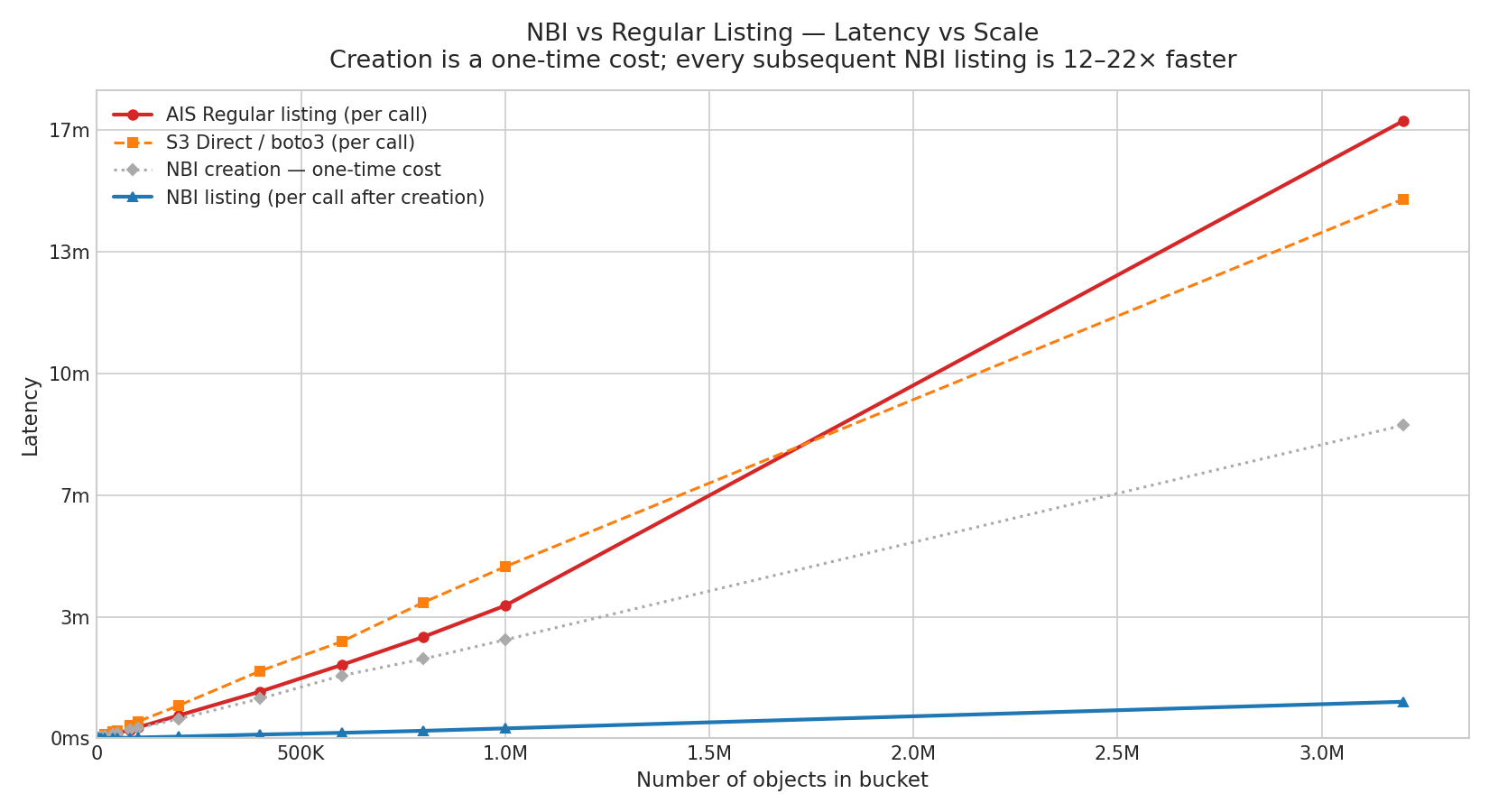
<p>We measured listing latency across 15 scale points from 1K to 3.2M objects in an <code class="language-plaintext highlighter-rouge">s3://</code> bucket, with 3 runs per point. The chart below shows p50 latency for AIS regular listing, S3 direct (boto3), NBI creation (one-time), and NBI listing.</p>

<p><img src="/assets/nbi/nbi_scale.png" alt="NBI benchmark result" /></p>

<div class="language-plaintext highlighter-rouge"><div class="highlight"><pre class="highlight"><code>==========================================================================================================================
NBI latency-vs-scale  (3 runs each)
==========================================================================================================================
Objects     Creation    Regular          NBI          S3 Direct    Speedup
                         p50      sd     p50     sd    p50      sd   (R/N)
--------------------------------------------------------------------------
   1K          449ms    405ms   144ms    21ms    2ms   676ms    2.9s  19.0x
   2K          616ms    596ms    21ms    34ms    4ms   480ms   251ms  17.6x
   5K          811ms     1.2s   161ms    51ms   33ms    1.4s   186ms  22.4x
  10K           1.8s     1.9s   177ms   147ms   35ms    2.7s   165ms  12.6x
  20K           3.5s     3.4s   106ms   248ms   20ms    6.2s   154ms  13.8x
  40K           7.2s     7.2s   358ms   550ms   95ms   10.8s   278ms  13.2x
  50K           8.6s     8.8s   689ms   631ms   30ms   12.9s   242ms  13.9x
  80K          13.9s    13.8s    1.1s    1.0s   22ms   21.4s   995ms  13.2x
 100K          17.0s    17.9s   387ms    1.4s   45ms   27.3s   822ms  12.6x
 200K          31.8s    37.6s    2.1s    2.9s  225ms   53.8s    6.6s  13.1x
 400K         1m  5s   1m 16s   364ms    6.3s  698ms  1m 50s    4.8s  12.3x
 600K         1m 43s    2m 0s    1.8s    9.1s  276ms  2m 39s    3.5s  13.3x
 800K         2m 10s   2m 46s    2.2s   12.5s  939ms  3m 43s   901ms  13.4x
   1M         2m 42s   3m 38s   920ms   16.4s  213ms  4m 42s   10.7s  13.3x
 3.2M         8m 34s  16m 55s    4.3s   1m 0s   2.8s 14m 46s   23.1s  16.9x
==========================================================================================================================
</code></pre></div></div>

<p>NBI listing latency still increases with object count because it scans locally stored inventory data, but its absolute latency remains far lower than regular listing. On the chart, the NBI curve appears almost flat compared to a regular AIS list or a direct S3 list. The speedup remains consistent across the entire 1K-3.2M range, reaching up to <strong>16.9x</strong> at 3.2M objects.</p>

<h2 id="current-limitations">Current Limitations</h2>

<p>NBI is <strong>experimental</strong> in AIStore 4.3, and the current implementation keeps inventory management intentionally simple. At the moment, AIStore supports only one inventory per bucket, so concurrent inventories for the same bucket are not supported. Inventories are created manually via CLI or SDK and remain static until they are recreated or removed; if an inventory already exists and you want a new one, you can recreate it with <code class="language-plaintext highlighter-rouge">--force</code>, or simply remove it first with <code class="language-plaintext highlighter-rouge">ais nbi rm</code> and then create it again.</p>

<p>The current creation path is also optimized for correctness and simplicity rather than minimum backend work. During inventory creation, all targets walk the remote bucket in parallel and each keeps only its own portion of the results. Automatic refresh and more efficient creation strategies are planned for future releases.</p>

<blockquote>
  <p><strong>Note:</strong> NBI replaces the older S3-specific <code class="language-plaintext highlighter-rouge">--s3-inventory</code> path, which depended on provider-generated CSV/Parquet inventory files. The new implementation is AIS-native, backend-agnostic, and does not require external tooling.</p>
</blockquote>

<h2 id="when-to-use-nbi-and-when-not-to">When to Use NBI (and When Not To)</h2>

<p><strong>Good fit:</strong></p>

<ul>
  <li>Large remote buckets (100K+ objects) that are listed repeatedly</li>
  <li>Training pipelines that enumerate a dataset before each epoch</li>
  <li>Data audits or dashboards that scan bucket contents periodically</li>
  <li>Any workflow where the bucket is relatively stable between listings</li>
</ul>

<p><strong>Not a good fit:</strong></p>

<ul>
  <li>Small buckets — creation cost exceeds the listing savings</li>
  <li>Rapidly changing buckets — the snapshot goes stale quickly, and frequent recreation negates the benefit</li>
  <li><code class="language-plaintext highlighter-rouge">ais://</code> buckets — metadata is already local (to each <em>listing</em> target), so NBI provides no speedup</li>
  <li>One-off listings — if you only list a bucket once, the creation overhead is pure cost</li>
</ul>

<h2 id="conclusion">Conclusion</h2>

<p>NBI delivers <strong>15x better listing performance</strong> for large remote buckets, with measured speedups reaching <strong>14-22x</strong> across the range we tested. That makes it a practical solution for repeated listing of multi-million-object <code class="language-plaintext highlighter-rouge">s3://</code>, <code class="language-plaintext highlighter-rouge">gs://</code>, and other remote buckets where rebuilding the full result from the backend on every request is too slow and too expensive.</p>

<h2 id="references">References</h2>

<ul>
  <li><a href="https://github.com/NVIDIA/aistore/blob/main/docs/nbi.md">NBI documentation</a></li>
  <li><a href="https://github.com/NVIDIA/aistore/blob/main/python/tests/perf/nbi/bench.py">NBI benchmark script</a></li>
</ul>]]></content><author><name>Tony Chen, Abhishek Gaikwad</name></author><category term="aistore" /><category term="nbi" /><category term="benchmark" /><category term="optimization" /><summary type="html"><![CDATA[AIStore 4.3 introduces Native Bucket Inventory (NBI), a new mechanism for accelerating large remote-bucket listings by turning a repeatedly expensive operation into a local, reusable metadata path. Instead of traversing a remote bucket on every ais ls, AIS can precompute the bucket inventory once, persist it as compact binary chunks in the cluster, and answer subsequent listing requests directly from that local snapshot.]]></summary></entry><entry><title type="html">Parallel Download: 9x Lower Latency for Large-Object Reads</title><link href="https://aistore.nvidia.com/blog/2026/03/25/parallel-download" rel="alternate" type="text/html" title="Parallel Download: 9x Lower Latency for Large-Object Reads" /><published>2026-03-25T00:00:00+00:00</published><updated>2026-03-25T00:00:00+00:00</updated><id>https://aistore.nvidia.com/blog/2026/03/25/parallel-download</id><content type="html" xml:base="https://aistore.nvidia.com/blog/2026/03/25/parallel-download"><![CDATA[<p>In AIStore 4.3, we introduced parallel download APIs to accelerate reads of large objects in an AIS cluster. Instead of pulling the entire object through one long sequential GET request stream, parallel download breaks the read into coordinated range-reads and fetches multiple chunks at the same time. Those chunks are then either consumed in order as a reader stream or written directly into their final offsets on the client side. By turning one serialized read path into many concurrent chunk transfers, parallel download can engage more disks on AIS targets, better utilize available network bandwidth, and significantly increase single-object throughput.</p>

<p>Our benchmarks confirm the impact: fetching a 128 GiB object via parallel download is up to <strong>9x faster</strong> than a standard single-stream GET request. When integrated with PyTorch DataLoader, parallel download reduces per-batch fetch latency by <strong>11x</strong> compared to single-stream GET on a 10 TiB bucket.</p>

<p>This post describes parallel download’s design, internal workflow, and the trade-offs behind its performance improvements. It also summarizes the current benchmark results and shows how to use it from the AIStore Python SDK and PyTorch.</p>

<h3 id="table-of-contents">Table of Contents</h3>

<ul>
  <li><a href="#motivation-why-parallel-download-scales-better-for-large-objects">Motivation</a></li>
  <li><a href="#architecture-and-workflow">Architecture and Workflow</a></li>
  <li><a href="#usage">Usage</a></li>
  <li><a href="#benchmark">Benchmark</a></li>
  <li><a href="#conclusion">Conclusion</a></li>
  <li><a href="#references">References</a></li>
</ul>

<h2 id="motivation-why-parallel-download-scales-better-for-large-objects">Motivation: Why Parallel Download Scales Better for Large Objects</h2>

<p>The motivation for parallel download starts with a simple observation: once an object becomes large enough, reading it through one sequential <code class="language-plaintext highlighter-rouge">GET</code> leaves a lot of the cluster’s available bandwidth unused. Starting from <a href="https://github.com/NVIDIA/aistore/releases/tag/v1.4.0#chunked-objects">AIStore 4.0</a>, AIStore has supported chunked objects as a first-class storage representation: the cluster actively creates the chunks, places them across storage devices, and manages that layout internally. Once the object is stored that way, the natural next step is to build a read path that can exploit the layout instead of collapsing everything back into one serialized stream. That is the role of parallel download. It turns one logical object read into multiple coordinated chunk reads and, in practice, unlocks two distinct performance gains:</p>

<ul>
  <li>
    <p><strong>Breaking the Single-Disk Limit</strong>: A single disk can only deliver so much read throughput, often well below the bandwidth of a modern data-center NIC. If a large object is fetched as one sequential stream, read throughput is effectively capped by the disk serving that stream. AIStore’s chunked object representation removes that bottleneck by distributing object chunks across the target’s available disks, allowing one logical object read to engage multiple disks in parallel.</p>
  </li>
  <li>
    <p><strong>Taking Advantage of NVMe Parallelism</strong>: NVMe SSDs are built around deep queues and internal parallelism (<a href="https://nvmexpress.org/wp-content/uploads/NVMe_Overview.pdf">NVMe Overview</a>), so they perform best when multiple read requests are in flight at the same time. Parallel chunk reads give the device more work to schedule concurrently across its internal resources, which often raises effective read throughput well beyond what one long sequential request can sustain. This is exactly the behavior we will see later in the benchmark results.</p>
  </li>
</ul>

<p>Taken together, these two effects point to the same strategy: concurrent chunk fetching. The client needs to understand the object’s chunk boundaries and issue multiple range-read requests in parallel while preserving the correct chunk order at the destination. That is exactly what parallel download does. When the object is large enough, parallel download can improve single-object throughput both by engaging more of the cluster’s storage layout and by driving more of the underlying NVMe read parallelism.</p>

<h2 id="architecture-and-workflow">Architecture and Workflow</h2>

<p>Parallel download uses a coordinator-worker design, but it has two distinct execution patterns depending on whether the caller consumes the object as a stream or materializes the full object in memory.</p>

<h3 id="1-streaming-mode-ring-buffer-transfer">1. Streaming Mode: Ring-Buffer Transfer</h3>

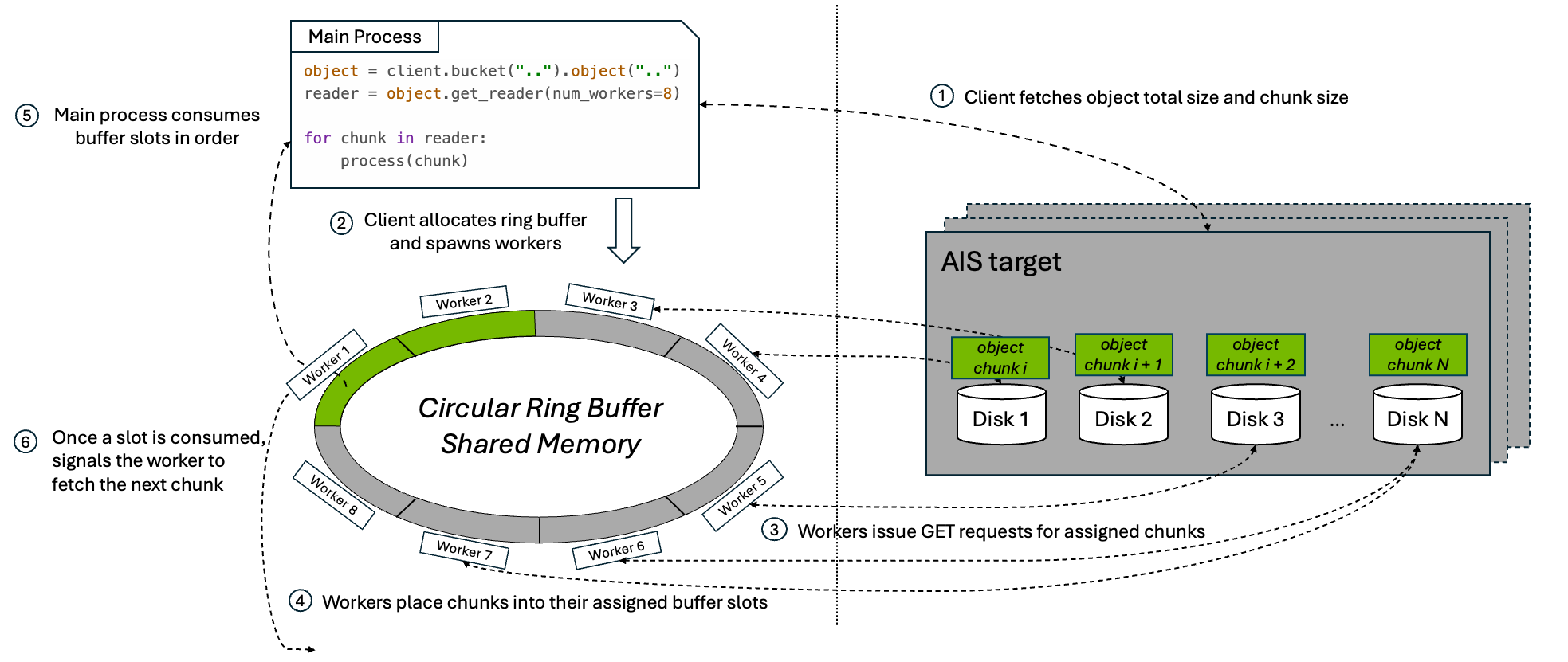
<p>When the caller consumes the object incrementally, the parallel download API uses a bounded ring buffer to preserve ordered streaming semantics while multiple chunk fetches stay in flight.</p>

<p><img src="/assets/multipart_download/mpd_streaming_workflow_diagram.png" alt="Parallel download streaming workflow" /></p>

<p>At a high level, the workflow is:</p>

<ol>
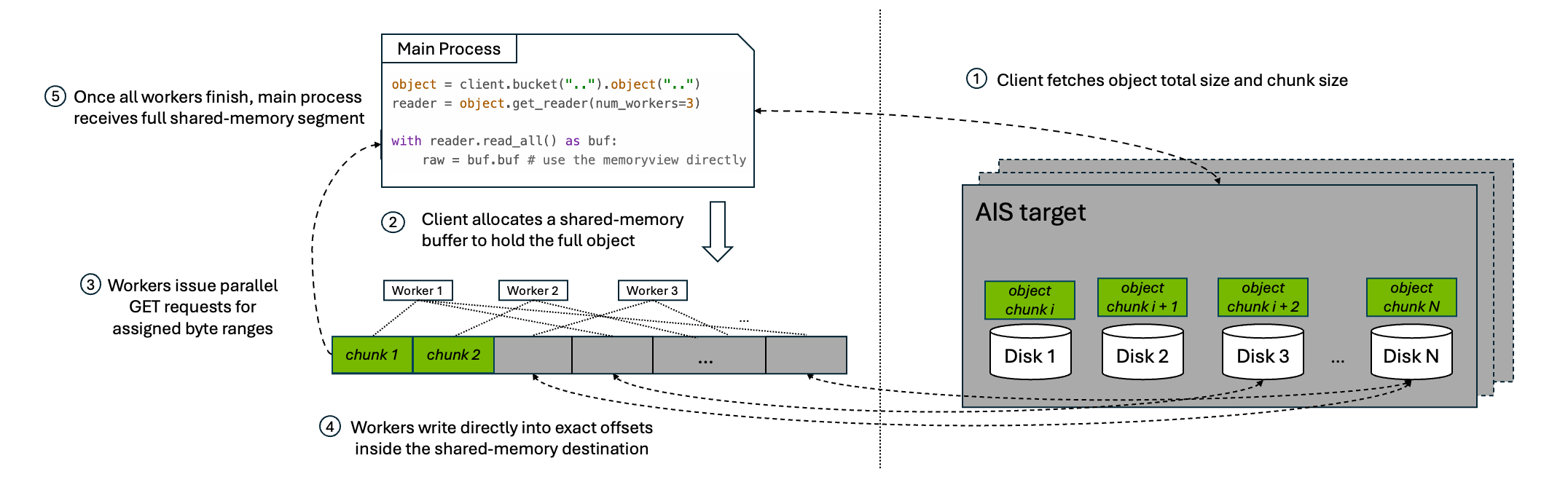
  <li>The client issues a <code class="language-plaintext highlighter-rouge">HEAD</code> request to fetch the object’s metadata, including total object size and chunk size.</li>
  <li>Parallel download allocates a shared buffer of size <code class="language-plaintext highlighter-rouge">num_workers * chunk_size</code>, giving each worker one slot in the ring, and spawns <code class="language-plaintext highlighter-rouge">num_workers</code> subprocesses.</li>
  <li>Each subprocess worker issues range-read <code class="language-plaintext highlighter-rouge">GET</code> requests for its assigned chunk.</li>
  <li>As chunks arrive, workers place them into their assigned buffer slots.</li>
  <li>The main process consumes the slots in order, preserving the original byte order of the object as it copies data into the reader output stream.</li>
  <li>Once a slot is fully consumed, the main process marks it reusable and signals the corresponding worker to fetch the next chunk.</li>
</ol>

<p>This loop continues until the entire object has been streamed to the caller.</p>

<p>The ring-buffer design matters for two reasons:</p>

<ul>
  <li><strong>Bounded memory usage</strong>: the buffer stays fixed at <code class="language-plaintext highlighter-rouge">num_workers * chunk_size</code> no matter how large the object is.</li>
  <li><strong>A full download pipeline</strong>: as soon as the consumer releases a slot, another range-read can begin, keeping the configured level of parallelism active until the final chunk is fetched.</li>
</ul>

<h3 id="2-full-object-mode-direct-shared-memory">2. Full-Object Mode: Direct Shared Memory</h3>

<p>When the caller needs the full object materialized in memory, the parallel download API does not use the ring buffer. Instead, it allocates one shared-memory segment large enough to hold the full object and downloads directly into that destination.</p>

<p><img src="/assets/multipart_download/mpd_full_object_workflow.png" alt="Parallel download full-object workflow" /></p>

<p>At a high level, the workflow is:</p>

<ol>
  <li>The client issues a <code class="language-plaintext highlighter-rouge">HEAD</code> request to fetch the object’s metadata, including total object size and chunk size.</li>
  <li>Parallel download allocates a shared-memory buffer to hold the full object.</li>
  <li>Worker subprocesses issue parallel range-read <code class="language-plaintext highlighter-rouge">GET</code> requests for their assigned byte ranges.</li>
  <li>Each worker writes directly into its exact offset inside the final shared-memory destination.</li>
  <li>Once all workers finish, the caller receives a view over that full shared-memory segment.</li>
</ol>

<p>This pattern avoids the extra copy from ring-buffer slots into a streaming output, but it trades that for a much larger memory reservation because the full object must fit in shared memory at once.</p>

<h2 id="usage">Usage</h2>

<p>AIStore currently exposes parallel download through four interfaces: the Python SDK, PyTorch integration, the native Go API, and the CLI.</p>

<h3 id="python-sdk">Python SDK</h3>

<p>Use <code class="language-plaintext highlighter-rouge">get_reader(num_workers=...)</code> to enable parallel download for a single object read. The returned reader can be consumed as a streaming iterator:</p>

<div class="language-python highlighter-rouge"><div class="highlight"><pre class="highlight"><code><span class="kn">from</span> <span class="n">aistore</span> <span class="kn">import</span> <span class="n">Client</span>

<span class="n">client</span> <span class="o">=</span> <span class="nc">Client</span><span class="p">(</span><span class="sh">"</span><span class="s">AIS_ENDPOINT</span><span class="sh">"</span><span class="p">)</span>
<span class="n">bucket</span> <span class="o">=</span> <span class="n">client</span><span class="p">.</span><span class="nf">bucket</span><span class="p">(</span><span class="sh">"</span><span class="s">my_bucket</span><span class="sh">"</span><span class="p">)</span>

<span class="n">reader</span> <span class="o">=</span> <span class="n">bucket</span><span class="p">.</span><span class="nf">object</span><span class="p">(</span><span class="sh">"</span><span class="s">large-object.bin</span><span class="sh">"</span><span class="p">).</span><span class="nf">get_reader</span><span class="p">(</span><span class="n">num_workers</span><span class="o">=</span><span class="mi">8</span><span class="p">)</span>
<span class="k">for</span> <span class="n">chunk</span> <span class="ow">in</span> <span class="n">reader</span><span class="p">:</span>
    <span class="c1"># ...process the chunk
</span></code></pre></div></div>

<p>If your application needs the entire object materialized in memory, the same reader also supports <code class="language-plaintext highlighter-rouge">read_all()</code>. It returns a <code class="language-plaintext highlighter-rouge">ParallelBuffer</code> backed by shared memory. From there, you can either copy into a regular <code class="language-plaintext highlighter-rouge">bytes</code> object or access the underlying buffer directly and avoid the extra copy:</p>

<div class="language-python highlighter-rouge"><div class="highlight"><pre class="highlight"><code><span class="k">with</span> <span class="n">bucket</span><span class="p">.</span><span class="nf">object</span><span class="p">(</span><span class="sh">"</span><span class="s">large-object.bin</span><span class="sh">"</span><span class="p">).</span><span class="nf">get_reader</span><span class="p">(</span><span class="n">num_workers</span><span class="o">=</span><span class="mi">8</span><span class="p">).</span><span class="nf">read_all</span><span class="p">()</span> <span class="k">as</span> <span class="n">buf</span><span class="p">:</span>
    <span class="n">raw</span> <span class="o">=</span> <span class="n">buf</span><span class="p">.</span><span class="nf">tobytes</span><span class="p">()</span>  <span class="c1"># option 1: copy into a new bytes object
</span>    <span class="n">raw</span> <span class="o">=</span> <span class="n">buf</span><span class="p">.</span><span class="n">buf</span>        <span class="c1"># option 2: use the memoryview directly
</span></code></pre></div></div>

<blockquote>
  <p><strong>Note:</strong> <code class="language-plaintext highlighter-rouge">read_all()</code> does not use the streaming ring buffer. It allocates a full-size shared-memory segment for the object and downloads the entire object into that buffer. On Linux, those shared-memory objects are normally created through POSIX shared memory and exposed via <code class="language-plaintext highlighter-rouge">/dev/shm</code>. As a result, very large objects can consume shared-memory capacity quickly and also contribute to overall memory pressure. If you use this path on Linux, monitor <code class="language-plaintext highlighter-rouge">/dev/shm</code> usage during testing, for example with <code class="language-plaintext highlighter-rouge">df -h /dev/shm</code>. Prefer the streaming iterator when the full object does not need to be materialized in memory at once.</p>
</blockquote>

<p><strong>Use Case</strong>: High-throughput reads for a single large object from an AIS cluster.</p>

<h3 id="pytorch-integration">PyTorch Integration</h3>

<p><code class="language-plaintext highlighter-rouge">AISParallelMapDataset</code> plugs directly into the standard PyTorch <code class="language-plaintext highlighter-rouge">DataLoader</code>. Each <code class="language-plaintext highlighter-rouge">__getitem__</code> call downloads one object using parallel range-reads and returns a <code class="language-plaintext highlighter-rouge">ParallelBuffer</code>:</p>

<div class="language-python highlighter-rouge"><div class="highlight"><pre class="highlight"><code><span class="kn">from</span> <span class="n">torch.utils.data</span> <span class="kn">import</span> <span class="n">DataLoader</span>
<span class="kn">from</span> <span class="n">aistore</span> <span class="kn">import</span> <span class="n">Client</span>
<span class="kn">from</span> <span class="n">aistore.pytorch</span> <span class="kn">import</span> <span class="n">AISParallelMapDataset</span>

<span class="n">bucket</span> <span class="o">=</span> <span class="nc">Client</span><span class="p">(</span><span class="sh">"</span><span class="s">AIS_ENDPOINT</span><span class="sh">"</span><span class="p">).</span><span class="nf">bucket</span><span class="p">(</span><span class="sh">"</span><span class="s">training-data</span><span class="sh">"</span><span class="p">)</span>
<span class="n">dataset</span> <span class="o">=</span> <span class="nc">AISParallelMapDataset</span><span class="p">(</span><span class="n">bucket</span><span class="p">,</span> <span class="n">num_workers</span><span class="o">=</span><span class="mi">8</span><span class="p">)</span>

<span class="n">loader</span> <span class="o">=</span> <span class="nc">DataLoader</span><span class="p">(</span><span class="n">dataset</span><span class="p">,</span> <span class="n">batch_size</span><span class="o">=</span><span class="mi">8</span><span class="p">,</span> <span class="n">num_workers</span><span class="o">=</span><span class="mi">2</span><span class="p">,</span> <span class="n">collate_fn</span><span class="o">=</span><span class="k">lambda</span> <span class="n">x</span><span class="p">:</span> <span class="n">x</span><span class="p">)</span>
<span class="k">for</span> <span class="n">batch</span> <span class="ow">in</span> <span class="n">loader</span><span class="p">:</span>
    <span class="k">for</span> <span class="n">name</span><span class="p">,</span> <span class="n">buf</span> <span class="ow">in</span> <span class="n">batch</span><span class="p">:</span>
        <span class="n">tensor</span> <span class="o">=</span> <span class="n">torch</span><span class="p">.</span><span class="nf">frombuffer</span><span class="p">(</span><span class="n">buf</span><span class="p">.</span><span class="n">buf</span><span class="p">,</span> <span class="n">dtype</span><span class="o">=</span><span class="n">torch</span><span class="p">.</span><span class="n">float32</span><span class="p">)</span>
        <span class="c1"># ...train on tensor
</span>        <span class="n">buf</span><span class="p">.</span><span class="nf">close</span><span class="p">()</span> <span class="c1"># must be closed to avoid resource leak
</span></code></pre></div></div>

<blockquote>
  <p><strong>Note:</strong> There are two different <code class="language-plaintext highlighter-rouge">num_workers</code> settings here, and they control different kinds of parallelism. <code class="language-plaintext highlighter-rouge">AISParallelMapDataset(..., num_workers=N)</code> controls the workers used <em>inside each object download</em>. <code class="language-plaintext highlighter-rouge">DataLoader(..., num_workers=M)</code> controls PyTorch subprocesses that prefetch samples <em>across the batch pipeline</em>. Setting both to high values multiplies total concurrency, which can oversubscribe CPU resources and make shared-memory buffer lifetime harder to manage. In practice, treat these as two knobs competing for the same client-side resources, not as independent speedups you can increase without limit.</p>
</blockquote>

<p><strong>Use Case</strong>: Loading large objects (video tensors, audio clips, high-resolution images) into a PyTorch training pipeline where per-sample download latency is the bottleneck.</p>

<h3 id="go-api-stream-mode">Go API: Stream Mode</h3>

<p>The Go streaming variant is <code class="language-plaintext highlighter-rouge">api.MultipartDownloadStream()</code>. It is the Go equivalent of the Python reader-based API: it returns an <code class="language-plaintext highlighter-rouge">io.ReadCloser</code> and performs concurrent range-reads behind the scenes while keeping only a bounded ring buffer in memory.</p>

<div class="language-go highlighter-rouge"><div class="highlight"><pre class="highlight"><code><span class="n">reader</span><span class="p">,</span> <span class="n">attrs</span><span class="p">,</span> <span class="n">err</span> <span class="o">:=</span> <span class="n">api</span><span class="o">.</span><span class="n">MultipartDownloadStream</span><span class="p">(</span><span class="n">bp</span><span class="p">,</span> <span class="n">bck</span><span class="p">,</span> <span class="n">objName</span><span class="p">,</span> <span class="o">&amp;</span><span class="n">api</span><span class="o">.</span><span class="n">MpdStreamArgs</span><span class="p">{</span>
    <span class="n">NumWorkers</span><span class="o">:</span> <span class="m">8</span><span class="p">,</span>
    <span class="n">ChunkSize</span><span class="o">:</span>  <span class="m">8</span> <span class="o">*</span> <span class="n">cos</span><span class="o">.</span><span class="n">MiB</span><span class="p">,</span>
<span class="p">})</span>
<span class="k">if</span> <span class="n">err</span> <span class="o">!=</span> <span class="no">nil</span> <span class="p">{</span>
    <span class="k">return</span> <span class="n">err</span>
<span class="p">}</span>
<span class="k">defer</span> <span class="n">reader</span><span class="o">.</span><span class="n">Close</span><span class="p">()</span>

<span class="n">_</span><span class="p">,</span> <span class="n">err</span> <span class="o">=</span> <span class="n">io</span><span class="o">.</span><span class="n">Copy</span><span class="p">(</span><span class="n">dst</span><span class="p">,</span> <span class="n">reader</span><span class="p">)</span>
</code></pre></div></div>

<p><strong>Use Case</strong>: The Go interface for the same reader-based parallel-download workflow.</p>

<h3 id="cli">CLI</h3>

<p>The AIS CLI exposes parallel download through the <code class="language-plaintext highlighter-rouge">--mpd</code> option for large-object downloads. Under the hood, it uses the Go direct-write API <code class="language-plaintext highlighter-rouge">api.MultipartDownload()</code>, which writes each chunk directly into its final offset in the destination file.</p>

<p><strong>Use Case</strong>: Downloading a large object directly into a local file or other seekable destination with minimal client-side buffering.</p>

<div class="language-console highlighter-rouge"><div class="highlight"><pre class="highlight"><code><span class="gp">#</span><span class="w"> </span>Use <span class="sb">`</span><span class="nt">--mpd</span><span class="sb">`</span> option to download a single large object with parallel chunk fetching.
<span class="gp">$</span><span class="w"> </span>ais get ais://my-bucket/large-object.bin /tmp/large-object.bin <span class="nt">--mpd</span> <span class="nt">--num-workers</span> 8
</code></pre></div></div>

<h2 id="benchmark">Benchmark</h2>

<p>The following measurements show how much performance parallel download can unlock in practice.</p>

<h3 id="1-single-large-object-read">1. Single Large-Object Read</h3>

<p>Results in this section were produced with the <a href="https://github.com/NVIDIA/aistore/blob/main/python/tests/perf/parallel_download/single_object_grid_bench.py">single-object benchmark script</a>. We evaluated single large-object reads on two AIStore clusters. Both used the same overall configuration:</p>

<ul>
  <li><strong>Kubernetes Cluster</strong>: 3 bare-metal nodes, each hosting one AIS proxy (gateway) and one AIS target (storage server)</li>
  <li><strong>Benchmark Client</strong>: 1 client machine</li>
  <li><strong>Benchmark Object</strong>: one 128 GiB object</li>
  <li><strong>Target CPU</strong>: 48 cores per node</li>
  <li><strong>Target Memory</strong>: 995 GiB per node</li>
  <li><strong>Client CPU</strong>: 48 cores</li>
  <li><strong>Client Memory</strong>: 995 GiB</li>
  <li><strong>Client Network Bandwidth</strong>: 100 Gbps</li>
</ul>

<p>The two environments differed mainly in storage media and capacity:</p>

<h4 id="nvme-based-cluster-16--58-tib-nvme-ssds-per-target">NVMe-based Cluster: 16 × 5.8 TiB NVMe SSDs per Target</h4>

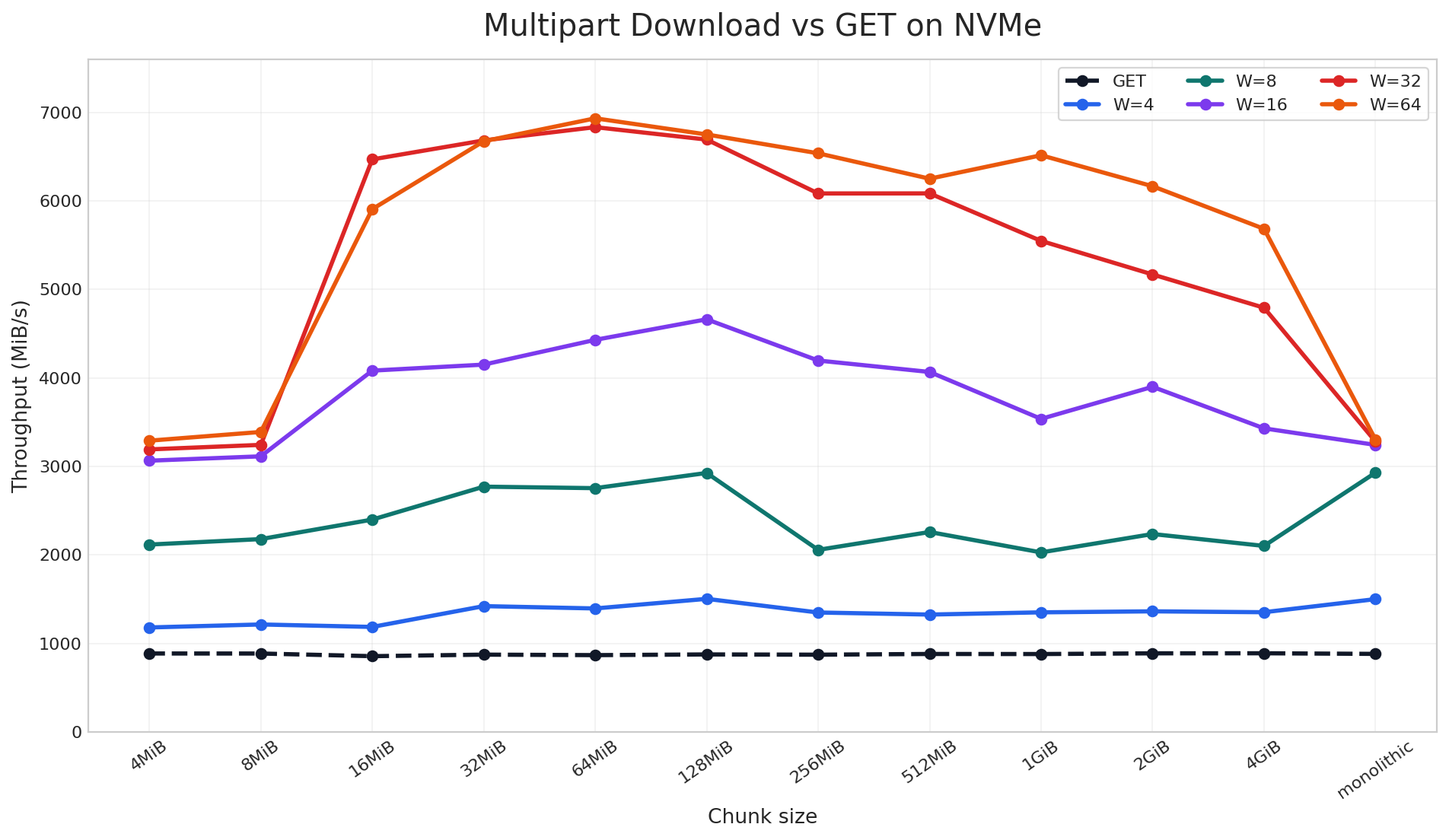
<p><img src="/assets/multipart_download/mpd_nvme_chunk_workers.png" alt="Parallel download throughput on NVMe" /></p>

<p>On the NVMe cluster, parallel download reached up to <strong>9x</strong> speedup over a standard single-stream GET in the large-object benchmark. The chart includes both chunked and non-chunked cases: the <code class="language-plaintext highlighter-rouge">monolithic</code> label means the object was stored as a regular non-chunked object, while the other labels are AIS chunk sizes used to distribute the object across disks. Across that full sweep, once multiple read requests are in flight, throughput rises sharply across nearly all chunk sizes. The best results come from combining sufficiently large chunks with enough workers to keep the device busy, which is the NVMe parallelism discussed earlier.</p>

<h4 id="hdd-based-cluster-10--91-tib-drives-per-target">HDD-based Cluster: 10 × 9.1 TiB Drives per Target</h4>

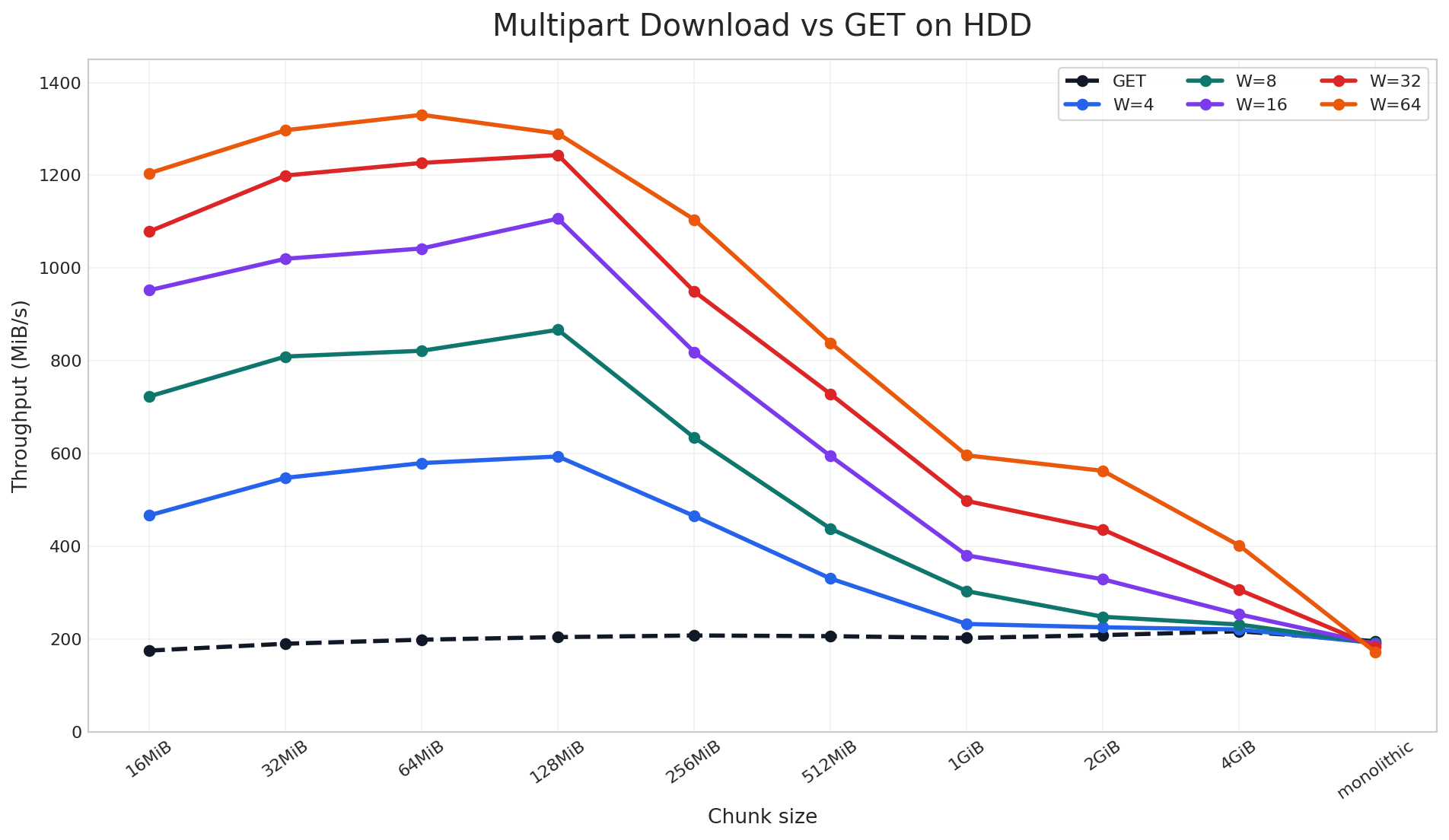
<p><img src="/assets/multipart_download/mpd_hdd_chunk_workers.png" alt="Parallel download throughput on HDD" /></p>

<p>On the HDD cluster, parallel download still delivered up to <strong>6.9x</strong> speedup, but the pattern is different. Here, the gain depends much more on the object being properly chunked across disks so that parallel download can read from multiple devices in parallel. Unlike NVMe, HDDs do not provide the same internal parallelism, so the improvement is more sensitive to chunk size and tapers off sooner for very large chunks.</p>

<p>Taken together, these two charts show that parallel download does not have a single best configuration that works everywhere. The optimal chunk size and worker count depend on your client-side resources, storage media, and object size distribution. For that reason, we encourage users to benchmark a small set of chunk-size and worker combinations on their own workload, find the sweet spot, and then use that setting for the full training or data-loading job. In our case, the best region was around <code class="language-plaintext highlighter-rouge">64-128 MiB</code> chunks with <code class="language-plaintext highlighter-rouge">64</code> workers, and we will carry that tuning into the next benchmark.</p>

<h3 id="2-full-data-loading-job-via-pytorch">2. Full Data-Loading Job via PyTorch</h3>

<p>Results in this section were produced with the <a href="https://github.com/NVIDIA/aistore/blob/main/python/tests/perf/pytorch/parallel_download.py">PyTorch data-loading benchmark script</a>. To measure end-to-end impact, we ran that benchmark on the same NVMe-based cluster described above. The workload used a 10.61 TiB bucket containing 1,589 large training-sample objects ranging from 2.51 GiB to 17.32 GiB (average 6.84 GiB).</p>

<p>Based on the single-object benchmark, <code class="language-plaintext highlighter-rouge">64 MiB</code> was the best chunk size on this cluster, so we rechunked the dataset before running the job:</p>

<div class="language-console highlighter-rouge"><div class="highlight"><pre class="highlight"><code><span class="gp">$</span><span class="w"> </span>ais bucket rechunk ais://mpd-bench <span class="nt">--chunk-size</span> 64MiB <span class="nt">--objsize-limit</span> 1
</code></pre></div></div>

<p>We then compared two end-to-end configurations over 64 batches with <code class="language-plaintext highlighter-rouge">batch_size=8</code>:</p>

<ul>
  <li><strong>GET</strong>: standard single-stream reads via <code class="language-plaintext highlighter-rouge">AISMapDataset</code></li>
  <li><strong>Parallel</strong>: per-object parallel downloads via <code class="language-plaintext highlighter-rouge">AISParallelMapDataset</code> with <code class="language-plaintext highlighter-rouge">workers=48</code></li>
</ul>

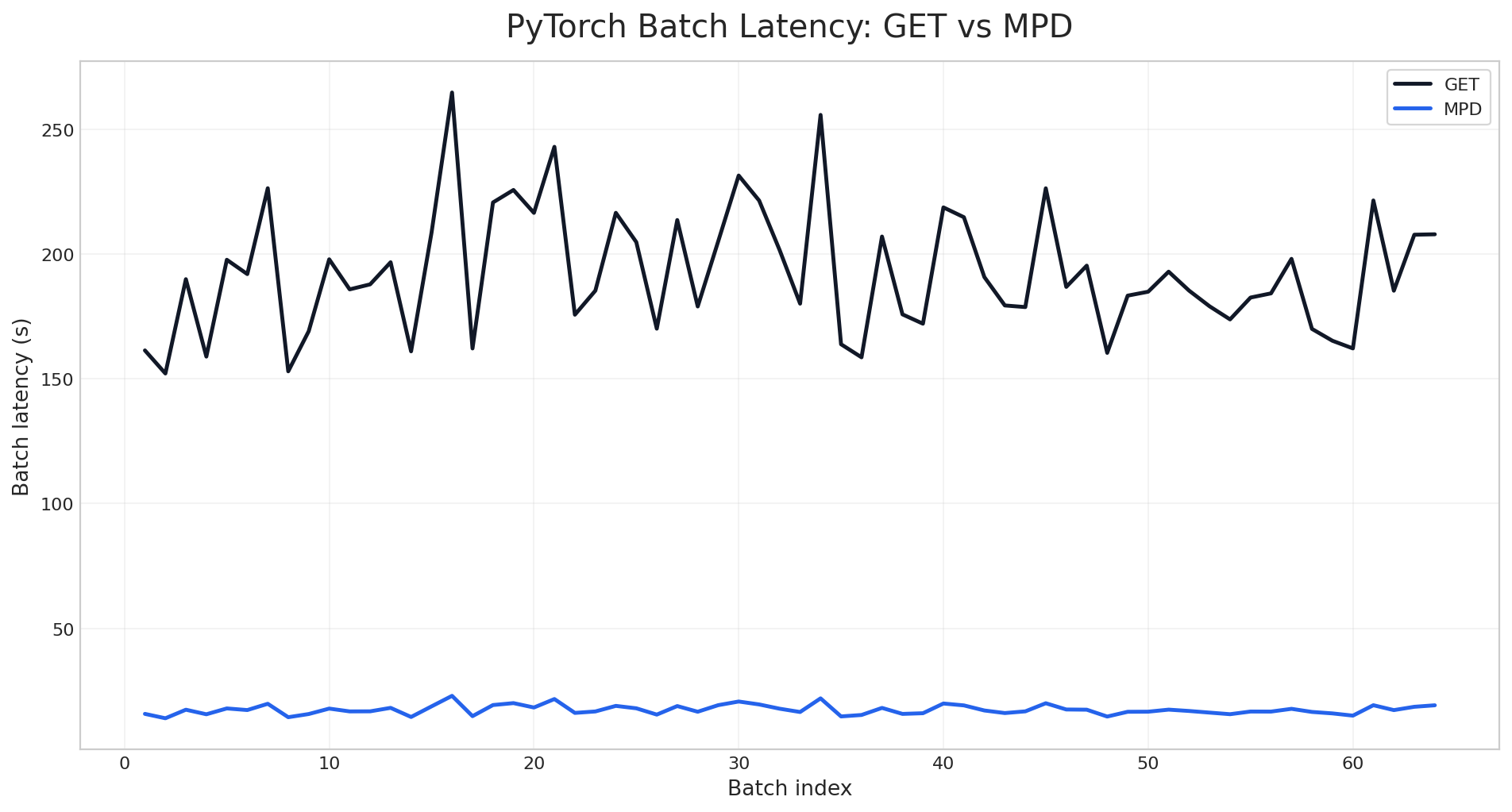
<p><img src="/assets/multipart_download/pytorch_batch_latency.png" alt="PyTorch batch latency: GET vs Parallel" /></p>

<p>As measured by the <a href="https://github.com/NVIDIA/aistore/blob/main/python/tests/perf/pytorch/parallel_download.py">PyTorch data-loading benchmark script</a>, the per-batch latency chart shows a clean separation between the two modes across the entire run. Standard GET stays in the 150-265 second range per batch, while the parallel mode stays near 14-23 seconds. The gap is not limited to a few outliers or warm-up effects; it persists across all 64 batches.</p>

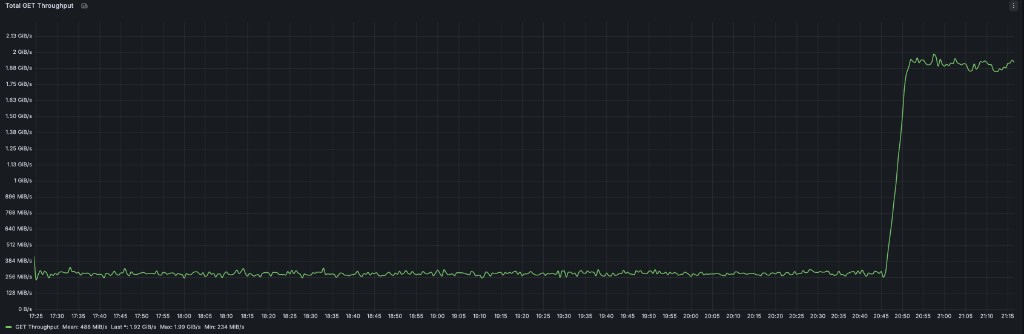
<p>The same pattern is visible at the cluster level. During the benchmark run, total GET throughput stays near the single-stream baseline while the GET phase is running, then jumps sharply when the parallel phase begins:</p>

<p><img src="/assets/multipart_download/pytorch_grafana_throughput_transition.png" alt="Grafana throughput during GET-to-Parallel transition" /></p>

<div class="language-plaintext highlighter-rouge"><div class="highlight"><pre class="highlight"><code>$ AIS_ENDPOINT=&lt;cluster-endpoint&gt; AIS_BUCKET=mpd-bench BATCH_SIZE=8 NUM_BATCHES=64 AIS_WORKERS=48 python3 python/tests/perf/pytorch/parallel_download.py
Bucket: ais://mpd-bench
Objects: 1589  total=10865.5 GiB  avg=6.84 GiB  min=2.51 GiB  max=17.32 GiB
Config:  batch_size=8  num_batches=64  parallel_workers=48
...
                               GET    Parallel   Speedup
──────────────────────────────────────────────────────────
Throughput (GiB/s)            0.28        3.09     11.0x
Samples/sec                   0.04        0.46     11.0x
Total wall time (s)       12322.12     1117.81     11.0x
Batch latency mean (s)      192.53       17.47     11.0x
Batch latency med (s)       187.31       17.23     10.9x
Batch latency p95 (s)       231.40       20.74     11.2x
Time-to-first-batch (s)     161.36       15.79     10.2x
</code></pre></div></div>

<p>The same gap appears in the aggregate results. The parallel mode raises throughput from <strong>0.28 GiB/s</strong> to <strong>3.09 GiB/s</strong>, cuts mean batch latency from <strong>192.53s</strong> to <strong>17.47s</strong>, and reduces total wall time from <strong>12,322s</strong> to <strong>1,118s</strong>. Across the full benchmark, the improvement stays consistently around <strong>10-11x</strong>.</p>

<h2 id="conclusion">Conclusion</h2>

<p>Parallel download gives AIStore a parallel read path for large objects by turning one logical <code class="language-plaintext highlighter-rouge">GET</code> into multiple coordinated chunk fetches. In practice, that allows the client to take advantage of chunked object placement across disks and, on NVMe-based systems, to drive much more of the storage device’s internal read parallelism.</p>

<p>In our benchmarks, parallel download improved single-object throughput by up to <strong>9x</strong> and reduced PyTorch per-batch latency by about <strong>11x</strong>. Those gains carried through from synthetic single-object reads to a realistic end-to-end data-loading job, showing that parallel download can translate directly into shorter training input pipelines when large objects dominate the workload.</p>

<h2 id="references">References</h2>

<ul>
  <li><a href="https://github.com/NVIDIA/aistore/releases/tag/v1.4.0#chunked-objects">AIStore 4.0 Release – Chunked Objects</a></li>
  <li><a href="https://github.com/NVIDIA/aistore/blob/main/python/aistore/sdk/obj/object.py">AIStore Python Object Reader</a></li>
  <li><a href="https://github.com/NVIDIA/aistore/blob/main/python/aistore/pytorch/parallel_map_dataset.py">AIStore PyTorch <code class="language-plaintext highlighter-rouge">AISParallelMapDataset</code></a></li>
  <li><a href="https://nvmexpress.org/wp-content/uploads/NVMe_Overview.pdf">NVM Express: NVMe Overview</a></li>
</ul>]]></content><author><name>Tony Chen</name></author><category term="aistore" /><category term="mpd" /><category term="benchmark" /><category term="optimization" /><category term="pytorch" /><summary type="html"><![CDATA[In AIStore 4.3, we introduced parallel download APIs to accelerate reads of large objects in an AIS cluster. Instead of pulling the entire object through one long sequential GET request stream, parallel download breaks the read into coordinated range-reads and fetches multiple chunks at the same time. Those chunks are then either consumed in order as a reader stream or written directly into their final offsets on the client side. By turning one serialized read path into many concurrent chunk transfers, parallel download can engage more disks on AIS targets, better utilize available network bandwidth, and significantly increase single-object throughput.]]></summary></entry><entry><title type="html">The Many Lives of a Dataset Called ‘data’</title><link href="https://aistore.nvidia.com/blog/2025/12/15/s3-data-with-namespace" rel="alternate" type="text/html" title="The Many Lives of a Dataset Called ‘data’" /><published>2025-12-15T00:00:00+00:00</published><updated>2025-12-15T00:00:00+00:00</updated><id>https://aistore.nvidia.com/blog/2025/12/15/s3-data-with-namespace</id><content type="html" xml:base="https://aistore.nvidia.com/blog/2025/12/15/s3-data-with-namespace"><![CDATA[<p>For whatever reason, a bucket called <code class="language-plaintext highlighter-rouge">s3://data</code> shows up with remarkable frequency as we deploy AIStore (AIS) clusters and populate them with user datasets. Likely for the same reason that <code class="language-plaintext highlighter-rouge">password = password</code> remains a popular choice.</p>

<p>At NVIDIA, for example, SwiftStack (an S3-compatible object store) is widely used internally. But it is rarely present alone.
Other S3-compatible systems appear more often than not: cloud accounts, regional replicas, compliance copies. It is a rule rather than the exception for several storage backends to quietly coexist in workloads run by any given team.</p>

<p>Hence, same-name datasets get copied, mutated, and passed across accounts, eventually finding their way back to us for concurrent use - e.g., <code class="language-plaintext highlighter-rouge">s3://data</code> in its many incarnations.</p>

<p>Same bucket name.<br />
Different endpoints.<br />
Different credentials.<br />
Different contents.</p>

<hr />

<h2 id="same-name-many-buckets">Same Name, Many Buckets</h2>

<p>In real deployments, what <code class="language-plaintext highlighter-rouge">s3://data</code> actually refers to often looks like this:</p>

<div class="language-plaintext highlighter-rouge"><div class="highlight"><pre class="highlight"><code>s3://data exists in:
├── SwiftStack (on-prem)
├── OCI (region ABC)
├── AWS S3 (us-east-1)
├── (and more)
</code></pre></div></div>

<p>From a human perspective, these buckets feel interchangeable. From a system’s perspective, they absolutely are not.</p>

<div style="display: flex; justify-content: center; margin: 50px 0;">
<img src="/assets/s3-data-with-namespace.png" width="800" style="max-width: 100%;" alt="The many lives of s3://data" />
</div>

<hr />

<h2 id="whats-in-the-name">What’s in the Name</h2>

<p>Traditional object storage APIs quietly assume that a bucket name uniquely identifies a dataset. That assumption breaks down the moment environments span multiple providers.</p>

<p>In AIS, a bucket is a triplet (see below) with <a href="https://github.com/NVIDIA/aistore/blob/main/docs/bucket.md#bucket-properties">properties</a>:</p>

<div class="language-text highlighter-rouge"><div class="highlight"><pre class="highlight"><code>          ┌────────── Bucket Identity ───────────┐
          │ ( provider, namespace, bucket name ) │
          └────────────────┬─────────────────────┘
                 ┌─────────┴─────────┐
                 │ bucket properties │
                 └───────────────────┘
</code></pre></div></div>

<p>Two buckets may share the same name and the same provider, yet belong to different namespaces - and therefore represent entirely different datasets. Credentials, policies, lifecycle rules, and contents remain isolated.</p>

<p>Bucket namespaces are not necessarily static (although they usually are).
In AIS, namespace resolution itself <em>can</em> be a runtime decision that’d entail distributing updated bucket metadata - typically a split-second operation.</p>

<hr />

<h2 id="dynamic-binding">Dynamic Binding</h2>

<p>Separately from namespace, AIS allows a logical bucket to be bound to another bucket as its backing data source.</p>

<blockquote>
  <p>Note: dynamic binding is <strong>not</strong> request forwarding or caching. It specifies where a dataset <strong>physically resides and how it is accessed remotely</strong>.</p>
</blockquote>

<p>A logical bucket (e.g., <code class="language-plaintext highlighter-rouge">ais://my-training-data</code>) may source its contents from:</p>

<ul>
  <li>an on-prem S3-compatible system,</li>
  <li>a public cloud bucket,</li>
  <li>a regional replica,</li>
  <li>or a derived dataset produced by a processing pipeline.</li>
</ul>

<p>Consider two related datasets:</p>

<ul>
  <li>Original: raw images, audio, or video with minimal labeling</li>
  <li>Processed: augmented, re-labeled, and reordered for efficient training</li>
</ul>

<p>Both represent the same logical corpus. Training code references a single name: <code class="language-plaintext highlighter-rouge">ais://my-training-data</code>.
At runtime, the platform decides which backing data to bind:</p>

<ul>
  <li>training --&gt; processed dataset</li>
  <li>validation --&gt; raw dataset</li>
  <li>debugging --&gt; local copy (or a subset thereof)</li>
  <li>compliance --&gt; immutable regional mirror</li>
</ul>

<div class="language-text highlighter-rouge"><div class="highlight"><pre class="highlight"><code>          ┌─────────────────────────────────────────────┐
          │                Application                  │
          │            ais://my-training-data           │
          └───────────────────────┬─────────────────────┘
                                  │
          ┌───────────────────────┴─────────────────────┐
          │               Bucket Identity               │
          │   (provider + namespace + bucket name)      │
          └───────────────────────┬─────────────────────┘
                                  │
          ┌───────────────────────┴─────────────────────┐
          │               Backend Binding               │
          │                 (at runtime)                │
          └───────────────────────┬─────────────────────┘
                                  - (current binding)
          ┌──────────────┬────────┴─────┬───────────────┐
          │  SwiftStack  │    AWS S3    │     OCI       │
          │   s3://data  │   s3://data  │  s3://data    │
          └──────────────┴──────────────┴───────────────┘
</code></pre></div></div>
<hr />

<h2 id="recap">Recap</h2>

<p>Bucket names are not identities.<br />
Dataset selection is a configuration and/or runtime decision, not an application concern.<br />
Infrastructure must absorb the complexity.</p>

<h2 id="references">References</h2>

<ul>
  <li><a href="https://github.com/NVIDIA/aistore">AIStore: scalable storage for AI applications</a></li>
  <li><a href="https://github.com/NVIDIA/aistore/blob/main/docs/bucket.md#bucket-properties">Bucket Properties</a></li>
  <li><a href="https://github.com/NVIDIA/aistore/blob/main/docs/providers.md">Backend Providers</a></li>
</ul>

<hr />
<p>PS. I’ve changed SwiftStack, OCI and AWS specifics in this post; the underlying problem and the solution - are real.</p>]]></content><author><name>Alex Aizman</name></author><category term="aistore" /><category term="namespace" /><category term="multi-cloud" /><category term="backend" /><category term="federated-storage" /><summary type="html"><![CDATA[For whatever reason, a bucket called s3://data shows up with remarkable frequency as we deploy AIStore (AIS) clusters and populate them with user datasets. Likely for the same reason that password = password remains a popular choice.]]></summary></entry><entry><title type="html">Blob Downloader: Accelerate Remote Object Fetching with Concurrent Range-Reads</title><link href="https://aistore.nvidia.com/blog/2025/11/26/blob-downloader" rel="alternate" type="text/html" title="Blob Downloader: Accelerate Remote Object Fetching with Concurrent Range-Reads" /><published>2025-11-26T00:00:00+00:00</published><updated>2025-11-26T00:00:00+00:00</updated><id>https://aistore.nvidia.com/blog/2025/11/26/blob-downloader</id><content type="html" xml:base="https://aistore.nvidia.com/blog/2025/11/26/blob-downloader"><![CDATA[<p>In AIStore 4.1, we extended <a href="https://github.com/NVIDIA/aistore/blob/main/docs/blob_downloader.md">blob downloader</a> to leverage the chunked object representation and speed up fetching remote objects. This design enables blob downloader to parallelize work across storage resources, yielding a substantial performance improvement for large-object retrieval.</p>

<p>Our benchmarks confirm the impact: fetching a 4GiB remote object via blob downloader is now <strong>4x faster</strong> than a standard cold-GET. When integrated with the prefetch job, this approach delivers a <strong>2.28x performance gain</strong> compared to monolithic fetch operations on a 1.56TiB S3 bucket.</p>

<p>This post describes the blob downloader’s design, internal workflow, and the optimizations that drive its performance improvements. It also outlines the benchmark setup, compares blob downloader against regular monolithic cold GETs, and shows how to use the blob downloader API from the supported clients.</p>

<h3 id="table-of-contents">Table of Contents</h3>

<ul>
  <li><a href="#motivation-why-blob-downloader-scales-better-for-large-object">Motivation</a></li>
  <li><a href="#architecture-and-workflow">Architecture and Workflow</a></li>
  <li><a href="#usage">Usage</a></li>
  <li><a href="#benchmark">Benchmark</a></li>
  <li><a href="#conclusion">Conclusion</a></li>
  <li><a href="#references">References</a></li>
</ul>

<h2 id="motivation-why-blob-downloader-scales-better-for-large-object">Motivation: Why Blob Downloader Scales Better for Large Object?</h2>

<p>Splitting large objects into smaller, manageable chunks for parallel downloading is a proven strategy to increase throughput and resilience. In fact, cloud providers like <a href="https://docs.aws.amazon.com/AmazonS3/latest/userguide/optimizing-performance-guidelines.html#optimizing-performance-guidelines-get-range">AWS</a> and <a href="https://cloud.google.com/blog/products/storage-data-transfer/improve-throughput-with-cloud-storage-client-libraries/">GCP</a> explicitly recommend concurrent <a href="https://www.rfc-editor.org/rfc/rfc7233#section-2.1">range-read</a> requests for optimal performance. The core advantages include:</p>

<ul>
  <li>
    <p><strong>Isolating Failures and Reducing Retries</strong>: With a single sequential stream, a network hiccup can force a restart or large rollback. With range-reads, failures are isolated to individual chunks, so only the affected chunk needs to be retried.</p>
  </li>
  <li>
    <p><strong>Leveraging Distributed Server Throughput</strong>: Cloud objects are typically spread across many disks and nodes. Concurrent range-reads allow the client to pull data from multiple storage nodes in parallel. This aligns with the provider’s internal architecture and bypasses the single-node or per-disk I/O limits.</p>
  </li>
</ul>

<p>Beyond these standard benefits, AIStore leverages the concurrent range-read pattern to unlock an architectural advantage: <strong>chunked object representation</strong>. <a href="https://github.com/NVIDIA/aistore/releases/tag/v1.4.0#chunked-objects">Introduced in AIStore 4.0</a>, this capability allows objects to be stored as separate chunk files, which are automatically distributed across all available disks on a target. This enables the blob downloader to stream each range-read payload directly to a local chunk file, achieving zero-copy efficiency and aggregating the full write bandwidth of all underlying disks.</p>

<h2 id="architecture-and-workflow">Architecture and Workflow</h2>

<p><img src="/assets/blob_downloader/blob_downloader_workflow.png" alt="Blob Downloader Workflow" /></p>

<p>The blob downloader uses a coordinator-worker pattern to execute the download process. When a request is initiated, the main coordinator thread fetch the remote object’s metadata to determine its total size and logically segments it into smaller chunks.</p>

<blockquote>
  <p>This is the same general pattern often referred to as a worker pool, a work-queue with a pool of workers, or a producer–consumer pipeline.</p>
</blockquote>

<p>Once the segmentation is complete, the coordinator initializes a pool of worker threads and begins dispatching work. It assigns specific byte ranges to available workers, who then independently issue concurrent “Range Read” requests to the remote storage backend.</p>

<p>As workers receive data, they write each chunk directly to separate local files and report back to the coordinator to receive its next assignment. This continuous loop proceeds until every segment of the object has been successfully persisted.</p>

<h3 id="load-aware-runtime-adaptation">Load-Aware Runtime Adaptation</h3>

<p>Blob downloader is wired into AIStore’s <a href="https://github.com/NVIDIA/aistore/blob/main/cmn/load/README.md"><code class="language-plaintext highlighter-rouge">load</code> system</a>, which continuously grades node pressure (memory, CPU, goroutines, disk) and returns throttling advice.</p>

<p>At a high level, blob downloader:</p>
<ul>
  <li><strong>checks load once before starting</strong> a job and may reject or briefly delay it when the node is already under heavy memory pressure,</li>
  <li><strong>derives a safe chunk size</strong> from current memory conditions instead of blindly honoring the user’s request, and</li>
  <li><strong>lets workers occasionally back off</strong> (sleep) when disks are too busy while downloads are in progress.</li>
</ul>

<p>The result is that blob downloads run at full speed when the cluster has headroom, but automatically slow down instead of pushing the node into memory or disk overload.</p>

<h2 id="usage">Usage</h2>

<p>AIStore exposes blob download functionality through three distinct interfaces, each suited to different use cases.</p>

<h3 id="1-single-object-blob-download-job">1. Single Object Blob Download Job</h3>

<p>Start a blob download job for one or more specific objects.</p>

<p><strong>Use Case</strong>: Direct control over blob downloads, monitoring individual jobs.</p>

<p><strong>AIS CLI Example</strong>:</p>

<div class="language-console highlighter-rouge"><div class="highlight"><pre class="highlight"><code><span class="gp">#</span><span class="w"> </span>Download single large object
<span class="gp">$</span><span class="w"> </span>ais blob-download s3://my-bucket/large-model.bin <span class="nt">--chunk-size</span> 4MiB <span class="nt">--num-workers</span> 8 <span class="nt">--progress</span>
<span class="go">blob-download[X-def456]: downloading s3://my-bucket/large-model.bin
Progress: [████████████████████] 100% | 50.00 GiB/50.00 GiB | 2m30s

</span><span class="gp">#</span><span class="w"> </span>Download multiple objects
<span class="gp">$</span><span class="w"> </span>ais blob-download s3://my-bucket <span class="nt">--list</span> <span class="s2">"obj1.tar,obj2.bin,obj3.dat"</span> <span class="nt">--num-workers</span> 4
</code></pre></div></div>

<h3 id="2-prefetch--blob-downloader">2. Prefetch + Blob Downloader</h3>

<p>The <code class="language-plaintext highlighter-rouge">prefetch</code> operation is integrated with blob downloader via a configurable <strong>blob-threshold</strong> parameter. When this threshold is set (by default, it is disabled), prefetch routes objects whose size meets or exceeds the value to an internal blob-download job, while smaller objects continue to use standard cold GET.</p>

<p><strong>Use Case</strong>: Batch prefetching of remote buckets where some objects are very large, letting the job automatically decide when to engage blob downloader behind the scenes.</p>

<p><strong>AIS CLI Example</strong>:</p>

<div class="language-console highlighter-rouge"><div class="highlight"><pre class="highlight"><code><span class="gp">#</span><span class="w"> </span>List remote bucket
<span class="gp">$</span><span class="w"> </span>ais <span class="nb">ls </span>s3://my-bucket
<span class="go">NAME             SIZE            CACHED
model.ckpt       12.50GiB        no
dataset.tar      8.30GiB         no
config.json      4.20KiB         no

</span><span class="gp">#</span><span class="w"> </span>Prefetch with 1 GiB threshold:
<span class="gp">#</span><span class="w"> </span>- objects ≥ threshold use blob downloader <span class="o">(</span>parallel chunks<span class="o">)</span>
<span class="gp">#</span><span class="w"> </span>- objects &lt; threshold use standard cold GET
<span class="gp">$</span><span class="w"> </span>ais prefetch s3://my-bucket <span class="nt">--blob-threshold</span> 1GiB <span class="nt">--blob-chunk-size</span> 8MiB
<span class="go">prefetch-objects[E-abc123]: prefetch entire bucket s3://my-bucket
</span></code></pre></div></div>

<h3 id="3-streaming-get">3. Streaming GET</h3>

<p>The blob downloader splits the object into chunks, downloads them concurrently into the cluster, and simultaneously streams the assembled result to the client as it arrives.</p>

<p><strong>Use Case</strong>: Stream a large object directly to the client while simultaneously caching it in the cluster.</p>

<p><strong>Python SDK Example</strong>:</p>

<div class="language-python highlighter-rouge"><div class="highlight"><pre class="highlight"><code><span class="kn">from</span> <span class="n">aistore</span> <span class="kn">import</span> <span class="n">Client</span>
<span class="kn">from</span> <span class="n">aistore.sdk.blob_download_config</span> <span class="kn">import</span> <span class="n">BlobDownloadConfig</span>

<span class="c1"># Set up AIS client and bucket
</span><span class="n">client</span> <span class="o">=</span> <span class="nc">Client</span><span class="p">(</span><span class="sh">"</span><span class="s">AIS_ENDPOINT</span><span class="sh">"</span><span class="p">)</span>
<span class="n">bucket</span> <span class="o">=</span> <span class="n">client</span><span class="p">.</span><span class="nf">bucket</span><span class="p">(</span><span class="n">name</span><span class="o">=</span><span class="sh">"</span><span class="s">my_bucket</span><span class="sh">"</span><span class="p">,</span> <span class="n">provider</span><span class="o">=</span><span class="sh">"</span><span class="s">aws</span><span class="sh">"</span><span class="p">)</span>

<span class="c1"># Configure blob downloader (4MiB chunks, 16 workers)
</span><span class="n">blob_config</span> <span class="o">=</span> <span class="nc">BlobDownloadConfig</span><span class="p">(</span><span class="n">chunk_size</span><span class="o">=</span><span class="sh">"</span><span class="s">4MiB</span><span class="sh">"</span><span class="p">,</span> <span class="n">num_workers</span><span class="o">=</span><span class="sh">"</span><span class="s">16</span><span class="sh">"</span><span class="p">)</span>

<span class="c1"># Stream large object using blob downloader settings
</span><span class="n">reader</span> <span class="o">=</span> <span class="n">bucket</span><span class="p">.</span><span class="nf">object</span><span class="p">(</span><span class="sh">"</span><span class="s">my_large_object</span><span class="sh">"</span><span class="p">).</span><span class="nf">get_reader</span><span class="p">(</span><span class="n">blob_download_config</span><span class="o">=</span><span class="n">blob_config</span><span class="p">)</span>
<span class="nf">print</span><span class="p">(</span><span class="n">reader</span><span class="p">.</span><span class="nf">readall</span><span class="p">())</span>
</code></pre></div></div>

<h2 id="benchmark">Benchmark</h2>

<p>The benchmark was run on an AIStore cluster using the following system configuration:</p>

<ul>
  <li><strong>Kubernetes Cluster</strong>: 3 bare-metal nodes, each hosting one AIS proxy (gateway) and one AIS target (storage server)</li>
  <li><strong>Storage</strong>: 16 × 5.8 TiB NVMe SSDs per target</li>
  <li><strong>CPU</strong>: 48 cores per node</li>
  <li><strong>Memory</strong>: 995 GiB per node</li>
  <li><strong>Network</strong>: dual 100 GbE (100000 Mb/s) NICs per node</li>
</ul>

<h3 id="1-single-blob-download-request">1. Single Blob Download Request</h3>

<p><img src="/assets/blob_downloader/blob_download_cold_get_comparison.png" alt="Blob Download vs. Cold GET" /></p>

<p>The chart above compares the time to fetch a single remote object using blob download versus a standard cold GET across a range of object sizes (16 MiB to 8 GiB).</p>

<p>For smaller objects, cold GET performs slightly better due to the coordination overhead inherent in blob download. However, once objects exceed <strong>256 MiB</strong>, blob download begins to show significant advantages. The speedup grows significantly with object size.</p>

<p>These results validate the architectural benefits discussed earlier: concurrent range-read requests combined with distributed chunk writes deliver substantial gains for large objects.</p>

<h3 id="2-prefetch-with-blob-download-threshold">2. Prefetch with Blob Download Threshold</h3>

<p>In the prefetch benchmark, we created an S3 bucket containing <strong>4,443 remote objects</strong>, ranging from <strong>10.68 MiB</strong> to <strong>3.53 GiB</strong> in size, for a total remote footprint of <strong>1.56 TiB</strong>.</p>

<div class="language-console highlighter-rouge"><div class="highlight"><pre class="highlight"><code><span class="gp">$</span><span class="w"> </span>ais bucket summary s3://ais-tonyche/blob-bench
<span class="go">NAME                     OBJECTS (cached, remote)        OBJECT SIZES (min, avg, max)            TOTAL OBJECT SIZE (cached, remote)
s3://ais-tonyche         0    4443                       10.68MiB   305.77MiB  3.53GiB           0         1.56TiB
</span></code></pre></div></div>

<p><img src="/assets/blob_downloader/prefetch_blob_threshold_comparison.png" alt="Prefetch Threshold Comparison" /></p>

<p>The chart above compares different <code class="language-plaintext highlighter-rouge">--blob-threshold</code> values for this mixed-size workload and reports both <strong>total prefetch duration</strong> and <strong>aggregate disk write throughput</strong>. In our environment, a threshold around <strong>256 MiB</strong> strikes the best balance by routing large objects through blob download while letting smaller objects use regular cold GET.</p>

<ul>
  <li><strong>If the threshold is set too high</strong>: blob downloader is underutilized because more parallelizable large objects fall back to monolithic GETs.</li>
  <li><strong>If the threshold is set too low</strong>: blob downloader is overused on small objects, flooding the system with chunked downloads and adding coordination overhead without improving throughput.</li>
</ul>

<p>Across all thresholds, the key pattern is that assigning a reasonable share of large objects to blob downloader raises aggregate disk write throughput, which in turn shortens total prefetch time. When the threshold is tuned so that genuinely large objects are handled via blob download, the cluster is able to drive the highest parallel writes across targets. In our setup, a threshold of about <strong>256 MiB</strong> achieved this balance, delivering a <strong>2.28×</strong> shorter prefetch duration than a pure monolithic cold GET of the same bucket.</p>

<h2 id="conclusion">Conclusion</h2>

<p>The key takeaway is simple: on real workloads with multi‑GiB objects, blob downloader reduces time to fetch large remote objects by up to <strong>4×</strong> in our benchmarks. It achieves this by driving much higher aggregate disk throughput than a single cold GET can sustain.</p>

<p>Benchmarks also show that performance is highly sensitive to the <code class="language-plaintext highlighter-rouge">--blob-threshold</code> setting: in our 1.56 TiB S3 bucket, a threshold around <strong>256 MiB</strong> maximized disk write throughput during the prefetch job. The ideal value in your deployment will depend on cluster configuration, network conditions, backend provider, and object size distribution, but there will almost always be a sweet spot where blob downloader is neither underutilized nor overused.</p>

<p>In practice, the guidance is simple: use a small benchmark to pick a reasonable threshold for your environment, and let blob downloader plus <code class="language-plaintext highlighter-rouge">load</code> advice handle the rest. Today, that choice is exposed as the <code class="language-plaintext highlighter-rouge">--blob-threshold</code> knob on prefetch jobs, while the <code class="language-plaintext highlighter-rouge">load</code> system ensures that even an aggressive setting won’t push targets into memory or disk overload. Longer term, the goal is to make this decision mostly internal — using observed object sizes and node load to engage blob downloader automatically — so most users can rely on sane defaults and only reach for explicit tuning when they really need it.</p>

<h2 id="references">References</h2>

<ul>
  <li><a href="https://docs.aws.amazon.com/AmazonS3/latest/userguide/optimizing-performance-guidelines.html#optimizing-performance-guidelines-get-range">AWS S3 performance guidelines – byte-range / parallel downloads</a></li>
  <li><a href="https://cloud.google.com/blog/products/storage-data-transfer/improve-throughput-with-cloud-storage-client-libraries/">GCP Cloud Storage – improving throughput with client libraries</a></li>
  <li><a href="https://www.rfc-editor.org/rfc/rfc7233#section-2.1">HTTP Range Requests (RFC 7233)</a></li>
  <li><a href="https://github.com/NVIDIA/aistore/releases/tag/v1.4.0#chunked-objects">AIStore 4.0 release – chunked objects</a></li>
  <li><a href="https://github.com/NVIDIA/aistore/blob/main/docs/blob_downloader.md">AIStore Blob Downloader documentation</a></li>
</ul>]]></content><author><name>Tony Chen</name></author><category term="aistore" /><category term="mpd" /><category term="benchmark" /><category term="optimization" /><category term="enhancements" /><summary type="html"><![CDATA[In AIStore 4.1, we extended blob downloader to leverage the chunked object representation and speed up fetching remote objects. This design enables blob downloader to parallelize work across storage resources, yielding a substantial performance improvement for large-object retrieval.]]></summary></entry><entry><title type="html">GetBatch API: faster data retrieval for ML workloads</title><link href="https://aistore.nvidia.com/blog/2025/10/06/get-batch-sequential" rel="alternate" type="text/html" title="GetBatch API: faster data retrieval for ML workloads" /><published>2025-10-06T00:00:00+00:00</published><updated>2025-10-06T00:00:00+00:00</updated><id>https://aistore.nvidia.com/blog/2025/10/06/get-batch-sequential</id><content type="html" xml:base="https://aistore.nvidia.com/blog/2025/10/06/get-batch-sequential"><![CDATA[<p>ML training and inference typically operate on batches of samples or data items. To simplify such workflows, AIStore 4.0 introduces the <code class="language-plaintext highlighter-rouge">GetBatch</code> API.</p>

<p>The API returns a single ordered archive - TAR by default - containing the requested objects and/or sharded files.</p>

<p>A given <code class="language-plaintext highlighter-rouge">GetBatch</code> may specify any number of items and span any number of buckets.</p>

<p>From the caller’s perspective, each request behaves like a regular synchronous GET, but you can read multiple batches in parallel.</p>

<p>Inputs may mix plain objects with any of the four supported shard formats (.tar, .tgz/.tar.gz, .tar.lz4, .zip), and outputs can use the same formats (default: TAR).</p>

<p>Ordering is strict: ask for data items named <code class="language-plaintext highlighter-rouge">A, B, C</code> - and the resulting batch will contain <code class="language-plaintext highlighter-rouge">A</code>, then <code class="language-plaintext highlighter-rouge">B</code>, then <code class="language-plaintext highlighter-rouge">C</code>.</p>

<blockquote>
  <p>Items A, B, C, etc. can reference plain objects or sharded files, stored locally or in remote cloud buckets.</p>
</blockquote>

<p>Two delivery modes are available. The <strong>streaming</strong> path starts sending as the resulting payload is assembled. The <strong>multipart</strong> path returns two parts: a small JSON header (<code class="language-plaintext highlighter-rouge">apc.MossOut</code>) with per-item status and sizes, followed by the archive payload.</p>

<p>Get-Batch provides the largest gains for small-to-medium object sizes, where it effectively amortizes TCP and connection-setup overheads across multiple requests. For larger objects, overall performance improvement tapers off because the data transfer time dominates total latency, making the per-request network overhead negligible in comparison.</p>

<p><img src="/assets/get-batch-sequential.png" alt="GetBatch: single-worker speed-up" /></p>

<p>Fig. 1. Up to 25x single-worker speed-up in early benchmarks.</p>

<p>The graph plots speed-up factor (Y-axis) against object size (X-axis), showing how batch size (<strong>100, 1K, 10K</strong> objects per batch) and object size affect performance. Each test used 10k objects on a 3-node AIStore cluster (48 CPUs, 187 GiB RAM, 10×9.1 TiB disks per node). The gains come from reducing per-request TCP overhead and parallelizing object fetches.</p>

<p>PS. Cluster-wide multi-worker benchmarks are in progress and will be shared soon.</p>]]></content><author><name>Abhishek Gaikwad</name></author><category term="aistore" /><category term="ml" /><category term="lhotse" /><category term="benchmark" /><category term="optimization" /><category term="enhancements" /><summary type="html"><![CDATA[ML training and inference typically operate on batches of samples or data items. To simplify such workflows, AIStore 4.0 introduces the GetBatch API.]]></summary></entry><entry><title type="html">Automated API Documentation Generation with GenDocs</title><link href="https://aistore.nvidia.com/blog/2025/08/29/automated-api-documentation-generation-with-gendocs" rel="alternate" type="text/html" title="Automated API Documentation Generation with GenDocs" /><published>2025-08-29T00:00:00+00:00</published><updated>2025-08-29T00:00:00+00:00</updated><id>https://aistore.nvidia.com/blog/2025/08/29/automated-api-documentation-generation-with-gendocs</id><content type="html" xml:base="https://aistore.nvidia.com/blog/2025/08/29/automated-api-documentation-generation-with-gendocs"><![CDATA[<h1 id="automated-api-documentation-generation-with-gendocs">Automated API Documentation Generation with GenDocs</h1>

<p>Maintaining accurate and up-to-date HTTP API documentation is critical for the developer experience when building and debugging SDKs. Clear HTTP documentation saves developers from digging through AIStore source code to understand expected endpoints, actions, query parameters, and request formats—whether implementing new features or troubleshooting issues in the SDK. With REST API endpoints spanning object management, cluster operations, ETL workflows, and administrative functions, manually maintaining this documentation quickly becomes a bottleneck that leads to inconsistencies and outdated information.</p>

<p>This is where <strong>GenDocs</strong> comes in—a powerful tool that automatically generates comprehensive <a href="https://spec.openapis.org/oas/latest.html">OpenAPI</a>/<a href="https://swagger.io/tools/swagger-ui/">Swagger</a> documentation directly from AIStore’s Go source code using descriptive annotation-based parsing.</p>

<p>GenDocs streamlines AIStore’s documentation workflow, eliminates manual maintenance overhead, and ensures that API documentation stays perfectly synchronized with the codebase as it evolves.</p>

<h2 id="the-challenge-scale-and-consistency">The Challenge: Scale and Consistency</h2>

<p>AIStore’s REST API surface is extensive, covering everything from basic object operations to complex multi-cloud data management and ETL transformations. Each endpoint requires documentation that includes:</p>

<ul>
  <li>HTTP methods and paths with parameter definitions</li>
  <li>Request/response schemas and examples</li>
  <li>Action-based operations with multiple model variants</li>
  <li>Interactive code samples and curl commands</li>
  <li>Proper categorization and cross-references</li>
</ul>

<p>Maintaining this manually across a rapidly evolving codebase presents several challenges:</p>

<ul>
  <li><strong>Synchronization Drift</strong>: Documentation inevitably falls behind code changes</li>
  <li><strong>Human Error</strong>: Manual updates are prone to inconsistencies and omissions</li>
  <li><strong>Developer Overhead</strong>: Engineers spend valuable time on documentation maintenance</li>
  <li><strong>Scalability</strong>: As the API grows, manual processes become increasingly unsustainable</li>
</ul>

<h2 id="the-gendocs-solution">The GenDocs Solution</h2>

<p>GenDocs solves these problems through <strong>annotation-driven documentation generation</strong>. Instead of maintaining separate documentation files, developers add lightweight annotations directly in the Go source code alongside their API handlers. GenDocs then parses these annotations to automatically generate comprehensive OpenAPI specifications which are rendered into a formatted website that developers can easily reference.</p>

<h3 id="core-design-principles">Core Design Principles</h3>

<ol>
  <li><strong>Developer-Friendly</strong>: Minimal annotation syntax that doesn’t clutter code</li>
  <li><strong>Source of Truth</strong>: Documentation lives alongside implementation code</li>
  <li><strong>Automatic Generation</strong>: Zero manual steps to update documentation</li>
  <li><strong>Universal format</strong>: Generates standard OpenAPI spec (YAML/JSON)</li>
</ol>

<h3 id="annotation-syntax">Annotation Syntax</h3>

<p>GenDocs uses a simple but powerful annotation format. Here’s how developers document an API endpoint:</p>

<div class="language-go highlighter-rouge"><div class="highlight"><pre class="highlight"><code><span class="c">// +gen:endpoint GET /v1/buckets/{bucket-name}/objects/{object-name} [provider=string]</span>
<span class="c">// Retrieves an object from the specified bucket.</span>
<span class="c">// Supports streaming for large objects and conditional requests.</span>
<span class="k">func</span> <span class="n">GetObject</span><span class="p">(</span><span class="n">w</span> <span class="n">http</span><span class="o">.</span><span class="n">ResponseWriter</span><span class="p">,</span> <span class="n">r</span> <span class="o">*</span><span class="n">http</span><span class="o">.</span><span class="n">Request</span><span class="p">)</span> <span class="p">{</span>
    <span class="c">// implementation...</span>
<span class="p">}</span>
</code></pre></div></div>

<p>This single annotation automatically generates:</p>
<ul>
  <li>OpenAPI endpoint definition</li>
  <li>Parameter documentation</li>
  <li>HTTP examples with proper curl commands</li>
</ul>

<h3 id="advanced-features">Advanced Features</h3>

<h4 id="action-based-endpoints">Action-Based Endpoints</h4>

<p>Many AIStore endpoints support multiple operations through action parameters. In AIStore, an “action” is a JSON message in the request body that at minimum includes an <code class="language-plaintext highlighter-rouge">{"action":"..."}</code> string; some actions also carry a structured <code class="language-plaintext highlighter-rouge">value</code> field. The action constants (e.g. <code class="language-plaintext highlighter-rouge">apc.ActCopyBck</code>) map to the action string used in the body, and the associated model defines the <code class="language-plaintext highlighter-rouge">value</code>.</p>

<div class="language-go highlighter-rouge"><div class="highlight"><pre class="highlight"><code><span class="c">// +gen:endpoint PUT /v1/buckets/{bucket-name} action=[apc.ActCopyBck=apc.TCBMsg|apc.ActETLBck=apc.TCBMsg]</span>
<span class="c">// +gen:payload apc.ActCopyBck={"action": "copy-bck", "value": {"dry_run": false}}</span>
<span class="c">// +gen:payload apc.ActETLBck={"action": "etl-bck", "value": {"id": "ETL_NAME"}}</span>
<span class="c">// Administrative bucket operations including copy and ETL transformations.</span>
<span class="k">func</span> <span class="n">BucketHandler</span><span class="p">(</span><span class="n">w</span> <span class="n">http</span><span class="o">.</span><span class="n">ResponseWriter</span><span class="p">,</span> <span class="n">r</span> <span class="o">*</span><span class="n">http</span><span class="o">.</span><span class="n">Request</span><span class="p">)</span> <span class="p">{</span>
    <span class="c">// implementation...</span>
<span class="p">}</span>
</code></pre></div></div>

<p>This generates comprehensive documentation showing:</p>
<ul>
  <li>All supported actions and their models</li>
  <li>Complete JSON payload examples</li>
</ul>

<h4 id="automatic-model-discovery">Automatic Model Discovery</h4>

<p>GenDocs automatically discovers Go structs marked with <code class="language-plaintext highlighter-rouge">// swagger:model</code> and incorporates them into the API documentation:</p>

<div class="language-go highlighter-rouge"><div class="highlight"><pre class="highlight"><code><span class="c">// swagger:model</span>
<span class="k">type</span> <span class="n">Transform</span> <span class="k">struct</span> <span class="p">{</span>
    <span class="n">Name</span>     <span class="kt">string</span>       <span class="s">`json:"id,omitempty"`</span>
    <span class="n">Pipeline</span> <span class="p">[]</span><span class="kt">string</span>     <span class="s">`json:"pipeline,omitempty"`</span>
    <span class="n">Timeout</span>  <span class="n">cos</span><span class="o">.</span><span class="n">Duration</span> <span class="s">`json:"request_timeout,omitempty" swaggertype:"primitive,integer"`</span>
<span class="p">}</span>
</code></pre></div></div>

<p>Note: <code class="language-plaintext highlighter-rouge">swaggertype</code> is only needed by swagger when mapping custom Go types (e.g., cos.Duration) to primitive types (e.g. <code class="language-plaintext highlighter-rouge">integer</code>) in the generated OpenAPI spec. Primitive fields like <code class="language-plaintext highlighter-rouge">string</code>, <code class="language-plaintext highlighter-rouge">int</code>, <code class="language-plaintext highlighter-rouge">bool</code>, etc. do not require it.</p>

<h4 id="intelligent-payload-generation">Intelligent Payload Generation</h4>

<p>For simple actions that only require an action name, GenDocs automatically generates basic payloads, reducing annotation overhead:</p>

<div class="language-go highlighter-rouge"><div class="highlight"><pre class="highlight"><code><span class="c">// +gen:endpoint PUT /v1/cluster action=[apc.ActResetConfig=apc.ActMsg|apc.ActRotateLogs=apc.ActMsg]</span>
<span class="c">// These simple actions auto-generate: {"action": "reset-config"} and {"action": "rotate-logs"}</span>
</code></pre></div></div>

<h2 id="integration-with-aistores-workflow">Integration with AIStore’s Workflow</h2>

<p>GenDocs is seamlessly integrated into AIStore’s development workflow and CI pipeline:</p>

<h3 id="documentation-website-deployment-workflow">Documentation Website Deployment Workflow</h3>

<ol>
  <li><strong>Code Changes</strong>: Developers add/modify API endpoints with annotations</li>
  <li><strong>Local Testing</strong>: <code class="language-plaintext highlighter-rouge">make api-docs-website</code> generates documentation locally</li>
  <li><strong>CI Pipeline</strong>: GitHub Actions automatically regenerates docs on merge</li>
  <li><strong>Website Deployment</strong>: Updated documentation is deployed to the AIStore website</li>
</ol>

<h3 id="build-process">Build Process</h3>

<p><img src="/assets/gendocs/gendocs-workflow.png" alt="GenDocs Workflow" />
<em>Figure: GenDocs multi-phase pipeline transforming source code annotations into comprehensive API documentation</em></p>
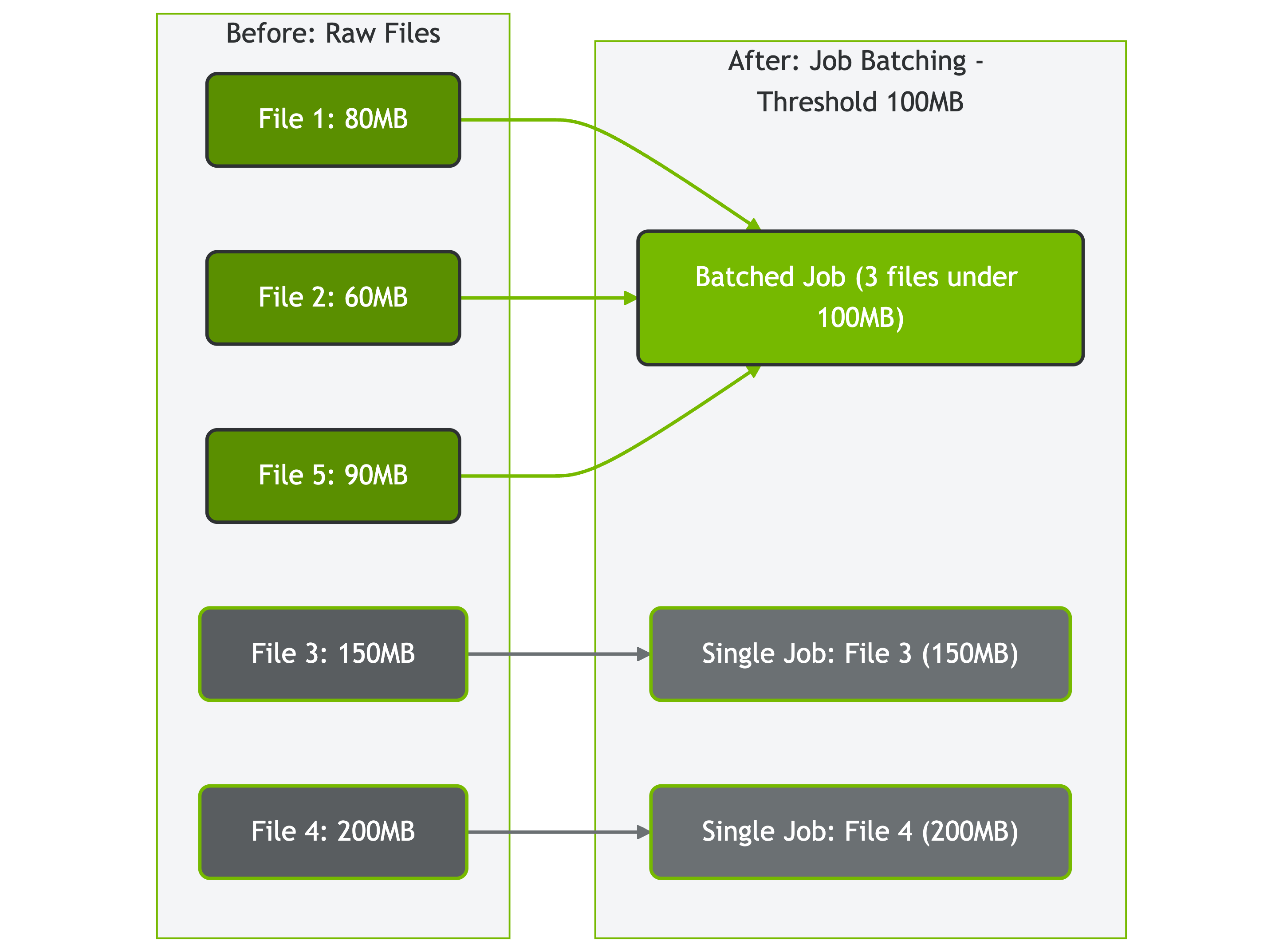
<p>The documentation generation process is a multi-stage pipeline that transforms source code annotations into an OpenAPI specification and markdown.</p>

<p>(1) The process begins when GenDocs scans the entire AIStore codebase, discovering every <code class="language-plaintext highlighter-rouge">+gen:endpoint</code> annotation and building a complete inventory of API endpoints, parameters, and data models. (2) During this discovery phase, the tool also collects <code class="language-plaintext highlighter-rouge">+gen:payload</code> definitions and (3) action mappings that will be used to generate realistic examples.</p>

<p>(4) Once the scanning is complete, GenDocs transforms these annotations into standard Swagger comments that can be processed by the OpenAPI toolchain. This transformation includes generating operation IDs, parameter documentation, and request/response schemas for each endpoint.</p>

<p>(5) The OpenAPI specification is then generated using the Swagger tooling, producing both YAML and JSON formats that contain the complete API definition. However, the standard OpenAPI specification lacks some of the rich metadata that makes AIStore’s documentation particularly useful.</p>

<p>(6) This is where GenDocs’ vendor extension system comes into play. The tool injects AIStore-specific extensions into the OpenAPI specification, including action-to-model mappings and complete HTTP examples with curl commands. These extensions are what enable the interactive features and comprehensive examples in the final documentation.</p>

<p>(7) The final step involves converting the enhanced OpenAPI specification into markdown format using the OpenAPI Generator CLI with custom templates. (8) This produces the website-ready documentation that is integrated into AIStore’s Jekyll-based documentation site.</p>

<p>In practice, the CI pipeline runs this workflow automatically—developers only need to provide the GenDocs annotation syntax.</p>

<h3 id="user-experience-enhancements">User Experience Enhancements</h3>

<p>The auto-generated documentation provides users with:</p>

<div class="language-bash highlighter-rouge"><div class="highlight"><pre class="highlight"><code><span class="c"># Working curl examples for every endpoint</span>
curl <span class="nt">-i</span> <span class="nt">-L</span> <span class="nt">-X</span> PUT <span class="se">\</span>
  <span class="nt">-H</span> <span class="s1">'Content-Type: application/json'</span> <span class="se">\</span>
  <span class="nt">-d</span> <span class="s1">'{"action": "copy-bck", "value": {"dry_run": false}}'</span> <span class="se">\</span>
  <span class="s1">'AIS_ENDPOINT/v1/buckets/source-bucket'</span>
</code></pre></div></div>

<h2 id="technical-architecture-and-annotations">Technical Architecture and Annotations</h2>

<h3 id="parsing-engine">Parsing Engine</h3>

<p>Maintaining accurate API documentation is difficult when complex model structs are spread across the codebase. Manually discovering these structs and keeping cross-references between endpoints, actions, and data models in sync is time-consuming and error-prone.</p>

<p>To solve this, the Abstract Syntax Tree (AST) parsing approach is used to analyze the codebase directly. It automatically discovers model structs, builds a complete inventory of API models and their relationships, and maintains precise links between <code class="language-plaintext highlighter-rouge">+gen:endpoint</code> annotations and their corresponding handler functions.</p>

<p>A second challenge is flexibility: developers often want to place annotations close to the logic they describe, even if that means spreading them across multiple files. For example, a payload definition might live near a helper function rather than in the main endpoint file.</p>

<p>By using a file walker that recursively scans the codebase, GenDocs is collecting every <code class="language-plaintext highlighter-rouge">+gen:payload</code> annotation. It then parses endpoints file-by-file, ensuring that payload definitions are correctly applied to their endpoints regardless of where they are declared.</p>

<p>To further reduce drift, we started with <a href="https://pkg.go.dev/cmd/go#hdr-Generate_Go_files_by_processing_source"><code class="language-plaintext highlighter-rouge">go generate</code></a> as the primary goal was to keep documentation annotations in line with the code. Annotations live next to handlers and regeneration runs with builds, so the docs track the exact code state—no separate “docs repo,” less drift, and less context‑switching for developers.</p>

<p>To prevent annotations from becoming too verbose, we auto‑generate simple <code class="language-plaintext highlighter-rouge">{ "action":"..." }</code> payloads where possible. When an action takes a structured <code class="language-plaintext highlighter-rouge">value</code> or a <code class="language-plaintext highlighter-rouge">name</code>, we add a <code class="language-plaintext highlighter-rouge">+gen:payload</code>. S3‑compatible endpoints are the exception—they expect XML. For those, we point to an XML body via <code class="language-plaintext highlighter-rouge">payload=</code>, and the generator switches the <code class="language-plaintext highlighter-rouge">Content‑Type</code> automatically.</p>

<p>On the spec side, <a href="https://github.com/swaggo/swag">Swaggo</a> scans Go code and inline annotations and emits an OpenAPI document that feeds straight into the website pipeline. For custom wrappers (for example, <code class="language-plaintext highlighter-rouge">cos.Duration</code>), the <code class="language-plaintext highlighter-rouge">swaggertype</code> tag tells the generator how the field should appear in the spec, keeping models faithful to the API’s serialization.</p>

<h3 id="descriptive-comments">Descriptive Comments</h3>

<p>Right after a <code class="language-plaintext highlighter-rouge">+gen:endpoint</code> line, GenDocs reads the plain comment lines and encapsulates them into the endpoint’s summary. Those few sentences become the description on the website detailing what it does, why a developer would call it, and any guardrails (auth, permissions, size limits).</p>

<p>Separately, model struct fields can include Go comments alongside their JSON which become per‑field descriptions in the generated schema (e.g., allowed values, units, defaults). Keeping these comments close to the code ensures the final API docs reflect the intended behavior and field semantics without manual editing. In addition, the vendor extension framework enables injection of AIStore-specific metadata while maintaining full OpenAPI specification compliance.</p>

<h3 id="case-study-isolating-a-client-issue-with-a-direct-api-call">Case Study: Isolating a client issue with a direct API call</h3>
<p>A bucket deletion operation failed when invoked via CLI. To determine whether the issue was in the client or the AIStore cluster, the operation was executed directly using the documented HTTP example generated by GenDocs. The direct API call succeeded, confirming server behavior was correct and narrowing the problem to the CLI implementation. This illustrates how canonical HTTP examples enable developers to easily isolate client‑versus‑server issues, reduce time to root cause, and focus fixes on the right component.</p>

<div class="language-bash highlighter-rouge"><div class="highlight"><pre class="highlight"><code>curl <span class="nt">-i</span> <span class="nt">-L</span> <span class="nt">-X</span> DELETE <span class="se">\</span>
  <span class="nt">-H</span> <span class="s1">'Content-Type: application/json'</span> <span class="se">\</span>
  <span class="nt">-d</span> <span class="s1">'{"action":"destroy-bck"}'</span> <span class="se">\</span>
  <span class="s1">'AIS_ENDPOINT/v1/buckets/BUCKET_NAME'</span>
</code></pre></div></div>

<h2 id="conclusion">Conclusion</h2>

<p>GenDocs is a shift in AIStore’s approach to API documentation—from manual 
maintenance to automated generation that scales with the codebase. By embedding documentation 
directly in source code through lightweight annotations, the tool eliminates synchronization 
issues while significantly improving documentation quality and the developer experience.</p>

<p>In practice, this yielded measurable benefits: comprehensive endpoint coverage, immediate updates with code changes, and consistent formatting across the API surface. Developers can focus on feature development rather than documentation maintenance, while users receive accurate, up‑to‑date documentation with working examples.</p>

<h2 id="references">References</h2>

<ul>
  <li><a href="https://github.com/NVIDIA/aistore/tree/main/tools/gendocs">GenDocs Tool Documentation</a></li>
  <li><a href="https://aistore.nvidia.com/docs/http-api">AIStore HTTP API Documentation</a></li>
  <li><a href="https://spec.openapis.org/oas/latest.html">OpenAPI Specification</a></li>
  <li><a href="https://github.com/NVIDIA/aistore">AIStore Repository</a></li>
  <li><a href="https://swagger.io/tools/swagger-ui/">Swagger UI Documentation</a></li>
</ul>]]></content><author><name>Anshika Ojha</name></author><category term="aistore" /><category term="tools" /><category term="documentation" /><category term="api" /><category term="swagger" /><category term="openapi" /><summary type="html"><![CDATA[Automated API Documentation Generation with GenDocs]]></summary></entry><entry><title type="html">AIStore + HuggingFace: Distributed Downloads for Large-Scale Machine Learning</title><link href="https://aistore.nvidia.com/blog/2025/08/22/huggingface-integration" rel="alternate" type="text/html" title="AIStore + HuggingFace: Distributed Downloads for Large-Scale Machine Learning" /><published>2025-08-22T00:00:00+00:00</published><updated>2025-08-22T00:00:00+00:00</updated><id>https://aistore.nvidia.com/blog/2025/08/22/huggingface-integration</id><content type="html" xml:base="https://aistore.nvidia.com/blog/2025/08/22/huggingface-integration"><![CDATA[<h1 id="aistore--huggingface-distributed-downloads-for-large-scale-machine-learning">AIStore + HuggingFace: Distributed Downloads for Large-Scale Machine Learning</h1>

<p>Machine learning teams increasingly rely on large datasets from <a href="https://huggingface.co/">HuggingFace</a> to power their models. But traditional download tools struggle with terabyte-scale datasets containing thousands of files, creating bottlenecks that slow development cycles.</p>

<p>This post introduces AIStore’s new HuggingFace download integration, which enables efficient downloads of large datasets with parallel batch jobs.</p>

<h2 id="table-of-contents">Table of contents</h2>
<ol>
  <li><a href="#background">Background</a></li>
  <li><a href="#cli-integration-simplified-workflows">CLI Integration: Simplified Workflows</a></li>
  <li><a href="#download-optimizations">Download Optimizations</a></li>
  <li><a href="#complete-walkthrough-nonverbaltts-dataset">Complete Walkthrough: NonverbalTTS Dataset</a></li>
  <li><a href="#next-steps">Next Steps</a></li>
  <li><a href="#conclusion">Conclusion</a></li>
</ol>

<h2 id="background">Background</h2>

<p>Sequential downloads create significant bottlenecks when dealing with complex datasets that have hundreds of thousands of files distributed across multiple directories.</p>

<p><a href="https://aistore.nvidia.com/">AIStore</a> addresses this by parallelizing downloads within each target using multiple workers (one per mountpath), batching jobs based on file size, and collecting file metadata in parallel. This approach leverages the network throughput from each individual target to the HuggingFace servers.</p>

<h2 id="cli-integration-simplified-workflows">CLI Integration: Simplified Workflows</h2>

<h3 id="prerequisites"><strong>Prerequisites</strong></h3>

<p>The following examples assume an active AIStore cluster. If the destination buckets (e.g., <code class="language-plaintext highlighter-rouge">ais://datasets</code>, <code class="language-plaintext highlighter-rouge">ais://models</code>) don’t exist, they will be created automatically with default properties.</p>

<p>AIStore’s <a href="https://aistore.nvidia.com/docs/cli">CLI</a> includes HuggingFace-specific flags for the <code class="language-plaintext highlighter-rouge">ais download</code> command that handle distributed operations behind the scenes.</p>

<h3 id="basic-download-commands"><strong>Basic Download Commands</strong></h3>

<div class="language-bash highlighter-rouge"><div class="highlight"><pre class="highlight"><code><span class="c"># Download entire dataset</span>
<span class="nv">$ </span>ais download <span class="nt">--hf-dataset</span> squad ais://datasets/squad/

<span class="c"># Download entire model  </span>
<span class="nv">$ </span>ais download <span class="nt">--hf-model</span> bert-base-uncased ais://models/bert/

<span class="c"># Download specific file</span>
<span class="nv">$ </span>ais download <span class="nt">--hf-dataset</span> squad <span class="nt">--hf-file</span> train/0.parquet ais://datasets/squad/
</code></pre></div></div>

<h3 id="authentication-and-configuration"><strong>Authentication and Configuration</strong></h3>

<div class="language-bash highlighter-rouge"><div class="highlight"><pre class="highlight"><code><span class="c"># Export your HuggingFace token and use for private/gated content</span>
<span class="nv">$ </span><span class="nb">export </span><span class="nv">HF_TOKEN</span><span class="o">=</span>your_hf_token_here
<span class="nv">$ </span>ais download <span class="nt">--hf-dataset</span> private-dataset <span class="nt">--hf-auth</span> <span class="nv">$HF_TOKEN</span> ais://private-data/

<span class="c"># Control batching with blob threshold</span>
<span class="nv">$ </span>ais download <span class="nt">--hf-dataset</span> large-dataset <span class="nt">--blob-threshold</span> 200MB ais://datasets/large/
</code></pre></div></div>

<h3 id="progress-monitoring"><strong>Progress Monitoring</strong></h3>

<div class="language-bash highlighter-rouge"><div class="highlight"><pre class="highlight"><code><span class="c"># Real-time progress tracking</span>
<span class="nv">$ </span>ais show job <span class="nt">--refresh</span> 2s

<span class="c"># Detailed job information</span>
<span class="nv">$ </span>ais show job download <span class="nt">--verbose</span>
</code></pre></div></div>

<h2 id="download-optimizations">Download Optimizations</h2>

<p>The system uses some key techniques to improve download performance:</p>

<h3 id="job-batching-size-based-distribution"><strong>Job Batching: Size-Based Distribution</strong></h3>
<p>Job batching categorizes files based on configurable size thresholds:</p>

<div class="language-bash highlighter-rouge"><div class="highlight"><pre class="highlight"><code><span class="c"># Configure blob threshold for job batching</span>
<span class="nv">$ </span>ais download <span class="nt">--hf-dataset</span> squad <span class="nt">--blob-threshold</span> 100MB ais://ml-datasets/
</code></pre></div></div>

<p>Files are categorized into two groups:</p>
<ul>
  <li><strong>Large files</strong> (above blob threshold): Get individual download jobs for maximum parallelism</li>
  <li><strong>Small files</strong> (below threshold): Batched together to reduce overhead</li>
</ul>

<p><img src="/assets/huggingface-integration/job-batching-diagram.png" alt="Job Batching Diagram" />
<em>Figure: How AIStore batches files based on size threshold (100MB in this example)</em></p>
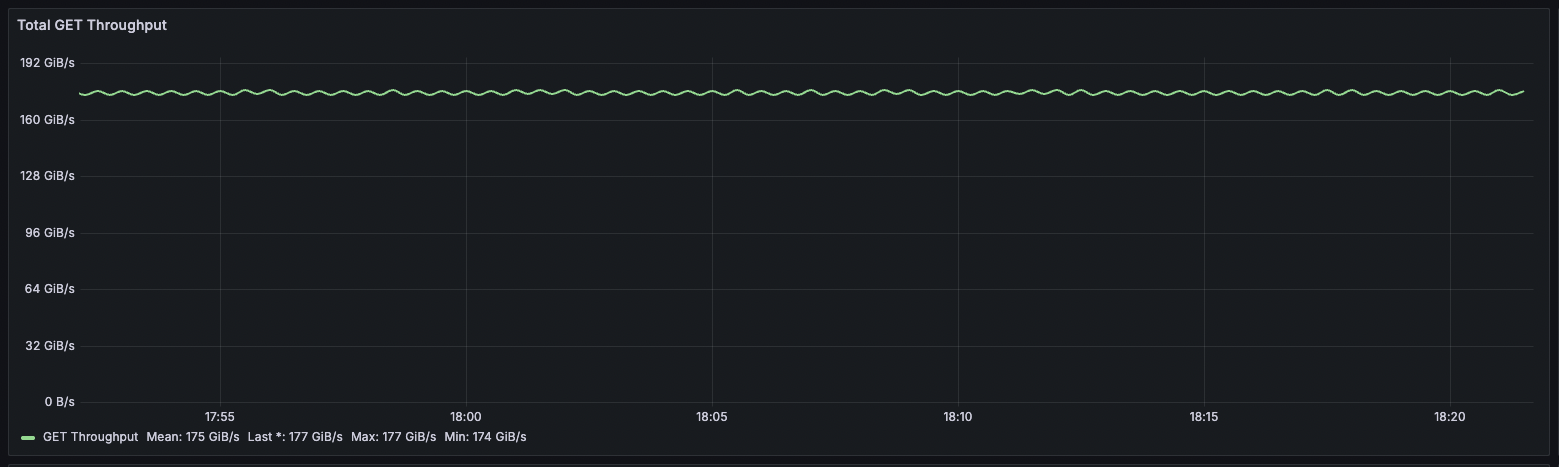
<h3 id="concurrent-metadata-collection"><strong>Concurrent Metadata Collection</strong></h3>
<p>Before downloading files, AIStore makes parallel HEAD requests to the HuggingFace API to collect file metadata (like file sizes) concurrently rather than sequentially. This reduces setup time for datasets with many files.</p>

<h2 id="complete-walkthrough-nonverbaltts-dataset">Complete Walkthrough: NonverbalTTS Dataset</h2>

<p>Let’s walk through an example downloading a machine learning dataset and processing it with ETL operations:</p>

<h3 id="walkthrough-prerequisites"><strong>Walkthrough Prerequisites</strong></h3>

<p>For this walkthrough, we’ll create and use three buckets:</p>
<ul>
  <li><code class="language-plaintext highlighter-rouge">ais://deepvs</code> - for the initial dataset download</li>
  <li><code class="language-plaintext highlighter-rouge">ais://ml-dataset</code> - for ETL-processed files</li>
  <li><code class="language-plaintext highlighter-rouge">ais://ml-dataset-parsed</code> - for the final parsed dataset</li>
</ul>

<p>If these buckets don’t exist, they will be created automatically with default properties.</p>

<h3 id="step-1-download-dataset-with-configurable-job-batching"><strong>Step 1: Download Dataset with Configurable Job Batching</strong></h3>
<div class="language-bash highlighter-rouge"><div class="highlight"><pre class="highlight"><code><span class="c"># Download deepvk/NonverbalTTS dataset with job batching</span>
<span class="nv">$ </span>ais download <span class="nt">--hf-dataset</span> deepvk/NonverbalTTS ais://deepvs <span class="nt">--blob-threshold</span> 500MB <span class="nt">--max-conns</span> 5
Found 11 parquet files <span class="k">in </span>dataset <span class="s1">'deepvk/NonverbalTTS'</span>
Created 7 individual <span class="nb">jobs </span><span class="k">for </span>files <span class="o">&gt;=</span> 500MiB
Started download job dnl-B-oOHruKH9
To monitor the progress, run <span class="s1">'ais show job dnl-B-oOHruKH9 --progress'</span>
</code></pre></div></div>

<h3 id="step-2-monitor-distributed-job-execution"><strong>Step 2: Monitor Distributed Job Execution</strong></h3>
<div class="language-bash highlighter-rouge"><div class="highlight"><pre class="highlight"><code><span class="c"># Watch configurable job distribution across cluster targets</span>
<span class="nv">$ </span>ais show job
download <span class="nb">jobs  
</span>JOB ID           XACTION         STATUS          ERRORS  DESCRIPTION
dnl-B-oOHruKH9   D6JOGa7PH9      1 pending       0       multi-download -&gt; ais://deepvs
dnl-zoOHr7PG3    D6JOGa7PH9      1 pending       0       https://huggingface.co/api/datasets/deepvk/NonverbalTTS/parquet/default/other/0.parquet -&gt; ais://deepvs/0.parquet
dnl-oJOHruKG3    D6JOGa7PH9      1 pending       0       https://huggingface.co/api/datasets/deepvk/NonverbalTTS/parquet/default/train/1.parquet -&gt; ais://deepvs/1.parquet
dnl-F_ogHauKH9   D6JOGa7PH9      1 pending       0       https://huggingface.co/api/datasets/deepvk/NonverbalTTS/parquet/default/train/2.parquet -&gt; ais://deepvs/2.parquet
dnl-PoOHr7KG9    D6JOGa7PH9      1 pending       0       https://huggingface.co/api/datasets/deepvk/NonverbalTTS/parquet/default/train/3.parquet -&gt; ais://deepvs/3.parquet
....
</code></pre></div></div>
<h3 id="step-3-verify-download-completion"><strong>Step 3: Verify Download Completion</strong></h3>
<div class="language-bash highlighter-rouge"><div class="highlight"><pre class="highlight"><code><span class="c"># Check bucket summary after download</span>
<span class="nv">$ </span>ais <span class="nb">ls </span>ais://deepvs <span class="nt">--summary</span>
NAME             PRESENT         OBJECTS         SIZE <span class="o">(</span>apparent, objects, remote<span class="o">)</span>        USAGE<span class="o">(</span>%<span class="o">)</span>
ais://deepvs     <span class="nb">yes             </span>6 0             2.76GiB 2.76GiB 0B                      0%
</code></pre></div></div>

<h3 id="options-for-using-downloaded-data"><strong>Options for Using Downloaded Data</strong></h3>

<p>At this point, you have several options:</p>

<ol>
  <li><strong>Use directly</strong>: Work with the downloaded files as-is if they meet your requirements</li>
  <li><strong>Transform with ETL</strong>: Apply preprocessing for format conversion, file organization, or data standardization</li>
  <li><strong>Custom processing</strong>: Use your own tools for data preparation</li>
</ol>

<p><strong>Why transform?</strong> HuggingFace datasets often have complex paths or formats that benefit from standardization. This walkthrough demonstrates ETL transformations for file organization (consistent naming) and format conversion (Parquet → JSON for framework compatibility).</p>

<h3 id="step-4-initialize-etl-transformers"><strong>Step 4: Initialize ETL Transformers</strong></h3>

<blockquote>
  <p><strong>Note:</strong> ETL operations require AIStore to be deployed on Kubernetes. See <a href="https://github.com/NVIDIA/aistore/blob/main/docs/etl.md">ETL documentation</a> for deployment requirements and setup instructions.</p>
</blockquote>

<p>Before applying transformations, initialize the required ETL containers:</p>

<div class="language-bash highlighter-rouge"><div class="highlight"><pre class="highlight"><code><span class="c"># Initialize batch-rename ETL transformer for file organization</span>
<span class="nv">$ </span>ais etl init <span class="nt">-f</span> https://raw.githubusercontent.com/NVIDIA/ais-etl/main/transformers/batch_rename/etl_spec.yaml

<span class="c"># Initialize parquet-parser ETL transformer for data parsing</span>
<span class="nv">$ </span>ais etl init <span class="nt">-f</span> https://raw.githubusercontent.com/NVIDIA/ais-etl/main/transformers/parquet-parser/etl_spec.yaml

<span class="c"># Verify ETL transformers are running</span>
<span class="nv">$ </span>ais etl show
</code></pre></div></div>

<h3 id="step-5-preprocessing-using-etl"><strong>Step 5: Preprocessing using ETL</strong></h3>
<div class="language-bash highlighter-rouge"><div class="highlight"><pre class="highlight"><code><span class="c"># Organize and rename files using batch rename ETL</span>
<span class="nv">$ </span>ais etl bucket batch-rename-etl ais://deepvs ais://ml-dataset
etl-bucket[BatchRename] ais://deepvs <span class="o">=&gt;</span> ais://ml-dataset

<span class="c"># Verify renamed files with structured naming</span>
<span class="nv">$ </span>ais <span class="nb">ls </span>ais://ml-dataset/
NAME                        SIZE            
train_0.parquet             485MiB          
train_1.parquet             492MiB          
train_2.parquet             511MiB          
...
</code></pre></div></div>

<div class="language-bash highlighter-rouge"><div class="highlight"><pre class="highlight"><code><span class="c"># Convert parquet files to JSON format for easier ML framework integration</span>
<span class="nv">$ </span>ais etl bucket parquet-parser-etl ais://ml-dataset ais://ml-dataset-parsed
etl-bucket[xO_sVT3Im] ais://ml-dataset <span class="o">=&gt;</span> ais://ml-dataset-parsed

<span class="c"># Verify processed dataset ready for ML training</span>
<span class="nv">$ </span>ais <span class="nb">ls </span>ais://ml-dataset-parsed <span class="nt">--summary</span>
NAME                         PRESENT         OBJECTS         SIZE <span class="o">(</span>apparent, objects, remote<span class="o">)</span>        USAGE<span class="o">(</span>%<span class="o">)</span>
ais://ml-dataset-parsed      <span class="nb">yes             </span>7 0             8.68GiB 8.68GiB 0B                      1%
</code></pre></div></div>

<h3 id="step-6-ml-pipeline-integration"><strong>Step 6: ML Pipeline Integration</strong></h3>

<p>AIStore integrates seamlessly with popular ML frameworks. Here’s how to use the processed dataset in your training pipeline:</p>

<h4 id="option-a-direct-sdk-usage-simple"><strong>Option A: Direct SDK Usage (Simple)</strong></h4>
<div class="language-python highlighter-rouge"><div class="highlight"><pre class="highlight"><code><span class="kn">from</span> <span class="n">aistore.sdk</span> <span class="kn">import</span> <span class="n">Client</span>
<span class="kn">import</span> <span class="n">json</span>

<span class="n">client</span> <span class="o">=</span> <span class="nc">Client</span><span class="p">(</span><span class="sh">"</span><span class="s">http://localhost:51080</span><span class="sh">"</span><span class="p">)</span>
<span class="n">bucket</span> <span class="o">=</span> <span class="n">client</span><span class="p">.</span><span class="nf">bucket</span><span class="p">(</span><span class="sh">"</span><span class="s">ml-dataset-parsed</span><span class="sh">"</span><span class="p">)</span>

<span class="c1"># Load processed training data
</span><span class="k">for</span> <span class="n">obj</span> <span class="ow">in</span> <span class="n">bucket</span><span class="p">.</span><span class="nf">list_objects</span><span class="p">():</span>
    <span class="k">if</span> <span class="n">obj</span><span class="p">.</span><span class="n">name</span><span class="p">.</span><span class="nf">startswith</span><span class="p">(</span><span class="sh">"</span><span class="s">train_</span><span class="sh">"</span><span class="p">):</span>
        <span class="n">data</span> <span class="o">=</span> <span class="n">json</span><span class="p">.</span><span class="nf">loads</span><span class="p">(</span><span class="n">obj</span><span class="p">.</span><span class="nf">get_reader</span><span class="p">().</span><span class="nf">read_all</span><span class="p">())</span>
        <span class="c1"># Process individual training samples
</span>        <span class="k">for</span> <span class="n">sample</span> <span class="ow">in</span> <span class="n">data</span><span class="p">:</span>
            <span class="c1"># Your training logic here
</span>            <span class="k">pass</span>
</code></pre></div></div>

<h4 id="option-b-pytorch-integration-recommended-for-ml-training"><strong>Option B: PyTorch Integration (Recommended for ML Training)</strong></h4>
<div class="language-python highlighter-rouge"><div class="highlight"><pre class="highlight"><code><span class="kn">from</span> <span class="n">aistore.sdk</span> <span class="kn">import</span> <span class="n">Client</span>
<span class="kn">from</span> <span class="n">aistore.pytorch</span> <span class="kn">import</span> <span class="n">AISIterDataset</span>
<span class="kn">from</span> <span class="n">torch.utils.data</span> <span class="kn">import</span> <span class="n">DataLoader</span>
<span class="kn">import</span> <span class="n">json</span>

<span class="c1"># Create dataset that reads directly from the cluster
</span><span class="n">client</span> <span class="o">=</span> <span class="nc">Client</span><span class="p">(</span><span class="sh">"</span><span class="s">http://localhost:51080</span><span class="sh">"</span><span class="p">)</span>
<span class="n">dataset</span> <span class="o">=</span> <span class="nc">AISIterDataset</span><span class="p">(</span><span class="n">ais_source_list</span><span class="o">=</span><span class="n">client</span><span class="p">.</span><span class="nf">bucket</span><span class="p">(</span><span class="sh">"</span><span class="s">ml-dataset-parsed</span><span class="sh">"</span><span class="p">))</span>

<span class="c1"># Configure DataLoader with multiprocessing
</span><span class="n">loader</span> <span class="o">=</span> <span class="nc">DataLoader</span><span class="p">(</span>
    <span class="n">dataset</span><span class="p">,</span>
    <span class="n">batch_size</span><span class="o">=</span><span class="mi">32</span><span class="p">,</span>
    <span class="n">num_workers</span><span class="o">=</span><span class="mi">4</span><span class="p">,</span>  <span class="c1"># Parallel data loading across multiple cores
</span><span class="p">)</span>

<span class="c1"># Training loop
</span><span class="k">for</span> <span class="n">batch_names</span><span class="p">,</span> <span class="n">batch_data</span> <span class="ow">in</span> <span class="n">loader</span><span class="p">:</span>
    <span class="c1"># Parse JSON data
</span>    <span class="n">parsed_samples</span> <span class="o">=</span> <span class="p">[</span><span class="n">json</span><span class="p">.</span><span class="nf">loads</span><span class="p">(</span><span class="n">data</span><span class="p">)</span> <span class="k">for</span> <span class="n">data</span> <span class="ow">in</span> <span class="n">batch_data</span><span class="p">]</span>
    
    <span class="c1"># Convert to tensors and train your model
</span>    <span class="c1"># model.train_step(parsed_samples)
</span>    <span class="k">pass</span>
</code></pre></div></div>

<h2 id="next-steps">Next Steps</h2>

<p>The HuggingFace integration opens up some practical areas for expansion:</p>

<p><strong>Download and Transform API</strong>: AIStore supports combining download and ETL transformation in a single API call, eliminating the two-step process shown in the walkthrough. This allows downloading HuggingFace datasets with immediate transformation (e.g., Parquet → JSON) in one operation. CLI integration for this functionality is in development.</p>

<p><strong>Additional Dataset Formats</strong>: Beyond the current Parquet support, HuggingFace datasets are available in multiple formats that teams commonly need:</p>
<ul>
  <li><strong>JSON format</strong> - Direct JSON downloads for frameworks requiring this format</li>
  <li><strong>CSV format</strong> - For traditional data processing workflows</li>
  <li><strong>WebDataset format</strong> - For large-scale ML pipelines using WebDataset</li>
</ul>

<h2 id="conclusion">Conclusion</h2>

<p>AIStore’s HuggingFace integration addresses common dataset download bottlenecks in machine learning workflows. Job batching and concurrent metadata collection enable efficient, <strong>parallel</strong> downloads of terabyte-scale datasets that would otherwise overwhelm traditional tools. Once stored in AIStore, teams can leverage local ETL operations to transform and prepare data without additional network transfers. This approach provides a streamlined path from raw downloads to training-ready datasets, eliminating the typical download-wait-process cycle that slows ML development.</p>

<hr />

<h2 id="references">References:</h2>

<p><strong>AIStore Core Documentation</strong></p>
<ul>
  <li><a href="https://github.com/NVIDIA/aistore">AIStore GitHub</a></li>
  <li><a href="https://aistore.nvidia.com/blog">AIStore Blog</a></li>
  <li><a href="https://github.com/NVIDIA/aistore/blob/main/docs/cli/download.md">AIStore Downloader Documentation</a></li>
  <li><a href="https://github.com/NVIDIA/aistore/tree/main/python/aistore/sdk">AIStore Python SDK</a></li>
  <li><a href="https://aistore.nvidia.com/blog/2024/08/28/pytorch-integration">AIStore PyTorch Integration</a> - High-performance data loading for ML training</li>
</ul>

<p><strong>ETL (Extract, Transform, Load) Resources</strong></p>
<ul>
  <li><a href="https://github.com/NVIDIA/aistore/blob/main/docs/etl.md">ETL Documentation</a> - Comprehensive guide to AIStore ETL capabilities and Kubernetes deployment</li>
  <li><a href="https://github.com/NVIDIA/aistore/blob/main/docs/cli/etl.md">ETL CLI Reference</a> - Command-line interface for ETL operations</li>
  <li><a href="https://github.com/NVIDIA/ais-etl/tree/main/transformers/batch_rename">Batch-Rename Transformer</a> - File organization and renaming</li>
  <li><a href="https://github.com/NVIDIA/ais-etl/tree/main/transformers/parquet-parser">Parquet Parser Transformer</a> - Parquet to JSON conversion</li>
  <li><a href="https://github.com/NVIDIA/ais-k8s">AIStore Kubernetes Deployment</a> - Production Kubernetes deployment tools and documentation</li>
</ul>

<p><strong>External Resources</strong></p>
<ul>
  <li><a href="https://huggingface.co/docs">HuggingFace Documentation</a></li>
  <li><a href="https://huggingface.co/docs/datasets/en/package_reference/main_classes">HuggingFace Datasets API Reference</a></li>
  <li><a href="https://parquet.apache.org/docs/overview/">Apache Parquet Format Specification</a></li>
</ul>]]></content><author><name>Nihal Nooney</name></author><category term="aistore" /><category term="huggingface" /><category term="machine-learning" /><category term="datasets" /><category term="cli" /><category term="performance" /><summary type="html"><![CDATA[AIStore + HuggingFace: Distributed Downloads for Large-Scale Machine Learning]]></summary></entry><entry><title type="html">The Perfect Line</title><link href="https://aistore.nvidia.com/blog/2025/07/26/smooth-max-line-speed" rel="alternate" type="text/html" title="The Perfect Line" /><published>2025-07-26T00:00:00+00:00</published><updated>2025-07-26T00:00:00+00:00</updated><id>https://aistore.nvidia.com/blog/2025/07/26/smooth-max-line-speed</id><content type="html" xml:base="https://aistore.nvidia.com/blog/2025/07/26/smooth-max-line-speed"><![CDATA[<p>I didn’t want to write this blog.</p>

<p>AIStore performance and scale-out story dates back to at least 2020, when we first presented our work at the IEEE Big Data Conference (<a href="https://arxiv.org/pdf/2001.01858">arxiv:2001.01858</a>). The linear scalability story was told and re-told, and the point was made. And so I really did not want to talk about it any longer.</p>

<p>But something has changed with our latest <a href="https://github.com/NVIDIA/aistore/releases/tag/v1.3.30">v3.30</a> benchmarks on a 16-node OCI cluster:</p>

<p><img src="/assets/smooth-max-line/cluster-throughput.png" alt="Aggregated cluster throughput" />
<strong>Fig. 1.</strong> Aggregated cluster throughput.</p>

<p>That’s a 100% random read workload at <code class="language-plaintext highlighter-rouge">10MiB</code> transfer size from an <code class="language-plaintext highlighter-rouge">87TB</code> dataset, with <code class="language-plaintext highlighter-rouge">1536 GB</code> RAM on each storage node (ensuring the data is served from disks).</p>

<div class="language-console highlighter-rouge"><div class="highlight"><pre class="highlight"><code><span class="gp">$</span><span class="w"> </span>ais <span class="nb">ls </span>ais://ais-bench-10mb <span class="nt">--summary</span>
<span class="go">NAME                     PRESENT     OBJECTS     SIZE (apparent, objects, remote)    USAGE(%)
ais://ais-bench-10mb     yes         8421329 0   80.31TiB 80.31TiB 0B                7%
</span></code></pre></div></div>

<h2 id="the-theoretical-limit">The Theoretical Limit</h2>

<p>When we talk about the raw power of our 16-node cluster, each equipped with a 100Gbps NIC, the numbers are impressive: 186 GiB/s.</p>

<blockquote>
  <p>Quick math. Per‑node link speed: 100Gbps = 12.5 GB/s ≈ 11.64 GiB/s. Cluster aggregate (16 nodes): 11.64 GiB/s × 16 ≈ 186 GiB/s</p>
</blockquote>

<p>This is the sheer, unadulterated, theoretical maximum aggregate throughput if every single bit could fly across the network without any processing, any protocol, or any pause. It represents the absolute ceiling of what the hardware could theoretically achieve assuming all those circumstances.</p>

<p>However, in the real world, data doesn’t just teleport. It needs to be packaged, routed, error-checked, and processed by the operating system and applications. This is where the networking stack overhead comes into play. Think of it like the ‘friction’ or ‘tax’ on the raw bandwidth.</p>

<p>This overhead isn’t just one thing; it’s a stack of small but measurable costs:</p>

<ul>
  <li>L3/L4 protocol headers: IPv4 + TCP add a minimum of 40B (52B with common SACK/TSopt options). Maybe the least expense, especially at Jumbo frames and also because LRO/GRO reduce the number of packet headers the host sees (by coalescing them).</li>
  <li>TLS handshake, TLS 5-byte headers, and TLS encryption (if HTTPS is used).</li>
  <li>Memory copies: the default TCP path copies payload once into kernel space and once via DMA.</li>
  <li>Context‑switch overhead (syscalls + IRQs).</li>
</ul>

<blockquote>
  <p>More about context switching: consider read-only HTTP traffic (no <code class="language-plaintext highlighter-rouge">sendfile</code>) whereby the server (like AIStore) is transmitting large payloads — large enough to utilize reusable 128K buffers. In other words, Tx path and a standard <code class="language-plaintext highlighter-rouge">io.CopyBuffer</code> at 128 KiB chunks. Each iteration performs two syscalls – <code class="language-plaintext highlighter-rouge">read(2)</code> on the local XFS file and <code class="language-plaintext highlighter-rouge">write(2)</code> on the socket – and therefore 4 (four) context switches (user =&gt; kernel and back for each call). Unlike <code class="language-plaintext highlighter-rouge">sendfile(2)</code>, this path touches userland twice: kernel =&gt; Go slice on <code class="language-plaintext highlighter-rouge">read()</code>, then Go slice =&gt; kernel on <code class="language-plaintext highlighter-rouge">write()</code>. At full network speed, that adds another ~23 GiB/s of DRAM traffic.</p>
</blockquote>

<p>Long story short, the actual achievable throughput is always lower due to various networking (and non-networking) overheads. The realistic percentage, bounded of course by the physical link, is highly contingent on the entire software stack and underlying infrastructure.</p>

<p>Industry sources typically cite <strong>85-95%</strong> range as the realistic maximum efficiency for high-speed Ethernet. Generally, 85% is considered <em>very good</em> while 95% is <em>exceptional</em> to the point of being almost unachievable.</p>

<h2 id="95">95%</h2>

<p>The observed performance is what ultimately prompted me reconsider the blog. As the monitoring graphs clearly show, our AIStore v3.30 cluster consistently achieves a sustained GET throughput with a mean of 175 GiB/s, frequently hitting peaks of 177 GiB/s for extended periods.</p>

<p><img src="/assets/smooth-max-line/node-throughput-times-16.png" alt="Node throughput (16 nodes)" />
<strong>Fig. 2.</strong> Node throughput (16 nodes).</p>

<p><img src="/assets/smooth-max-line/disk-utilization-times-16.png" alt="Disk (min, avg, max) utilizations (16 nodes)" />
<strong>Fig. 3.</strong> Disk (min, avg, max) utilizations (16 nodes).</p>
<blockquote>
  <p>As a side, disk utilization may serve as an indication for OCI to maybe consider adding another 100G port.</p>
</blockquote>

<p>This means we are effectively operating at <strong>95%</strong> of the theoretical maximum raw network capacity — exceeding what most industry sources consider the practical ceiling. But the numbers tell only part of the story. What really stands out is the consistency:</p>

<ul>
  <li>Time variance: under 2% during sustained runs</li>
  <li>Node variance: under 3% spread across all 16 nodes</li>
  <li>Disk utilization: a rock-steady 55–57% across all 192 NVMe drives</li>
  <li>Workload distribution: each node contributing roughly 11 GiB/s</li>
</ul>

<p>In short, the graphs show something you rarely encounter in practice: a distributed system operating at the physical limits of the underlying infrastructure.</p>

<p>Not bad for a “boring” benchmark that’s just a straight line.</p>]]></content><author><name>Alex Aizman</name></author><category term="aistore" /><category term="100GE" /><category term="line-rate" /><category term="linear-scalability" /><summary type="html"><![CDATA[I didn’t want to write this blog.]]></summary></entry><entry><title type="html">Single-Object Copy/Transform Capability</title><link href="https://aistore.nvidia.com/blog/2025/07/25/single-object-copy-transformation-capability" rel="alternate" type="text/html" title="Single-Object Copy/Transform Capability" /><published>2025-07-25T00:00:00+00:00</published><updated>2025-07-25T00:00:00+00:00</updated><id>https://aistore.nvidia.com/blog/2025/07/25/single-object-copy-transformation-capability</id><content type="html" xml:base="https://aistore.nvidia.com/blog/2025/07/25/single-object-copy-transformation-capability"><![CDATA[<h1 id="single-object-copytransform-capability">Single-Object Copy/Transform Capability</h1>

<p>In version 3.30, AIStore introduced a lightweight, flexible API to copy or transform a single object between buckets. It provides a simpler alternative to existing batch-style operations, ideal for fast, one-off object copy or transformation without the overhead of a full-scale job.</p>

<p>Notably, both the source and destination can be the local AIStore cluster or any of its <a href="https://github.com/NVIDIA/aistore/blob/main/docs/images/supported-backends.png">remote backends</a> (e.g., <code class="language-plaintext highlighter-rouge">s3://src/a</code> =&gt; <code class="language-plaintext highlighter-rouge">gs://dest/b</code>), making this feature especially useful for ad-hoc workflows and lightweight data preparation.</p>

<p>In this post, we’ll walk through the design and internal workflow that make this capability possible. We’ll also demonstrate how to use it with various supported clients, and compare it with existing copy mechanisms in AIStore to help you choose the right one for your use case.</p>

<h2 id="features-highlight">Features Highlight</h2>

<p>AIStore supports a variety of copy-object features, including <a href="/docs/cli/bucket.md#copy-cloud-bucket-to-another-cloud-bucket">bucket copy</a> and <a href="/docs/cli/bucket.md#copy-list-range-andor-prefix-selected-objects-or-entire-in-cluster-or-remote-buckets">multi-object copy</a>. However, these operations are designed as batch jobs that involve a more complex setup across the cluster to ensure all storage targets are ready and connected. While cluster-wide coordination ensures job can be executed or aborted seamlessly, it introduces noticeable overhead upfront — an unnecessary cost when the operation doesn’t require participation from all storage targets.</p>

<p>In contrast, the newly introduced single-object copy operation takes a simpler and more lightweight approach. It directly transfers the object from the source to the destination target in a single, synchronous step - bypassing the need for cluster-wide coordination and setup.</p>

<p>This direct transmission approach also allows the single-object copy operation to bypass the client entirely, offloading the responsibility of handling the object exchange. Unlike a GET-and-PUT sequence for copying, the client never needs to fetch or upload the object. The data moves entirely within the cluster, directly from the source to the destination target - all the client does is send the command. This becomes especially beneficial as object size increases, reducing client-side overhead and network usage.</p>

<p><img src="/assets/copy_object_diagram.png" alt="Copy Object Diagram" /></p>

<p>Additionally, the single-object copy workflow integrates seamlessly with ETL transformations. When an ETL is specified in the request’s parameter, the source target streams the object bytes to a local ETL container for transformation. Once processed, the transformed bytes are forwarded directly to the destination target — again, without routing through the client.</p>

<blockquote>
  <p>For more details on the direct put optimization, please refer to <a href="/docs/etl.md#direct-put-optimization">this documentation</a>.</p>
</blockquote>

<h2 id="usage">Usage</h2>

<h3 id="aistore-cli">AIStore CLI</h3>

<p>Here’s a quick example of how to use the single-object copy feature with the CLI:</p>

<div class="language-plaintext highlighter-rouge"><div class="highlight"><pre class="highlight"><code># Upload a local file to the source bucket
$ ais object put README.md ais://src/aaa
PUT "README.md" =&gt; ais://src/aaa

# Copy the object from AIStore to a GCP bucket
$ ais object cp ais://src/aaa gs://dest/bbb
COPY ais://src/aaa =&gt; gs://dest/bbb

# Download and verify the copied object
$ ais object get gs://dest/bbb
GET bbb from gs://dest as bbb (11.24KiB)
</code></pre></div></div>

<p>Using the feature with ETL transformation is just as straightforward. It follows the standard <code class="language-plaintext highlighter-rouge">ais etl</code> command pattern: specify the subcommand (<code class="language-plaintext highlighter-rouge">object</code>), provide the ETL name, and pass in the arguments.
Here’s an example that computes an object’s MD5 hash via single-object transformation:</p>

<div class="language-plaintext highlighter-rouge"><div class="highlight"><pre class="highlight"><code># Initialize an ETL transformer to compute MD5 hash values
$ ais etl init --name md5-etl -f https://raw.githubusercontent.com/NVIDIA/ais-etl/main/transformers/md5/etl_spec.yaml

# Perform a single-object transformation
$ ais etl object md5-etl cp ais://src/aaa ais://dest/bbb
ETL[md5-etl]: ais://src/aaa =&gt; ais://dest/bbb

# Retrieve the transformed object (MD5 hash value)
$ ais object get ais://dest/bbb -
# MD5 hash value of the original object "ais://src/aaa"
</code></pre></div></div>

<h3 id="aistore-python-sdk">AIStore Python SDK</h3>

<p>The <a href="/docs/python_sdk.md">Python SDK</a> provides an intuitive interface for using the single-object copy API.</p>

<div class="language-python highlighter-rouge"><div class="highlight"><pre class="highlight"><code><span class="c1"># Create source and destination buckets
</span><span class="n">src_bck</span> <span class="o">=</span> <span class="n">client</span><span class="p">.</span><span class="nf">bucket</span><span class="p">(</span><span class="sh">"</span><span class="s">src</span><span class="sh">"</span><span class="p">).</span><span class="nf">create</span><span class="p">(</span><span class="n">exist_ok</span><span class="o">=</span><span class="bp">True</span><span class="p">)</span>
<span class="n">dest_bck</span> <span class="o">=</span> <span class="n">client</span><span class="p">.</span><span class="nf">bucket</span><span class="p">(</span><span class="sh">"</span><span class="s">dest</span><span class="sh">"</span><span class="p">).</span><span class="nf">create</span><span class="p">(</span><span class="n">exist_ok</span><span class="o">=</span><span class="bp">True</span><span class="p">)</span>

<span class="c1"># Upload an object to the source bucket
</span><span class="n">src_obj</span> <span class="o">=</span> <span class="n">src_bck</span><span class="p">.</span><span class="nf">object</span><span class="p">(</span><span class="sh">"</span><span class="s">aaa</span><span class="sh">"</span><span class="p">)</span>
<span class="n">src_obj</span><span class="p">.</span><span class="nf">get_writer</span><span class="p">().</span><span class="nf">put_content</span><span class="p">(</span><span class="sa">b</span><span class="sh">"</span><span class="s">Hello World!</span><span class="sh">"</span><span class="p">)</span>

<span class="c1"># Prepare a destination object handle, and perform the copy operation
</span><span class="n">dest_obj</span> <span class="o">=</span> <span class="n">dest_bck</span><span class="p">.</span><span class="nf">object</span><span class="p">(</span><span class="sh">"</span><span class="s">bbb</span><span class="sh">"</span><span class="p">)</span>
<span class="n">src_obj</span><span class="p">.</span><span class="nf">copy</span><span class="p">(</span><span class="n">dest_obj</span><span class="p">)</span>

<span class="c1"># Verify that the object was copied correctly
</span><span class="nf">print</span><span class="p">(</span><span class="n">dest_obj</span><span class="p">.</span><span class="nf">get_reader</span><span class="p">().</span><span class="nf">read_all</span><span class="p">())</span>
<span class="c1"># Output: b'Hello World!'
</span></code></pre></div></div>

<p>To apply an ETL transformation as part of the copy operation, simply pass an <code class="language-plaintext highlighter-rouge">ETLConfig</code> to the <code class="language-plaintext highlighter-rouge">copy()</code> method. The SDK automatically handles the required parameter population:</p>

<div class="language-python highlighter-rouge"><div class="highlight"><pre class="highlight"><code><span class="c1"># Define and initialize a simple ETL that reverses object content
</span><span class="n">etl_reverse</span> <span class="o">=</span> <span class="n">client</span><span class="p">.</span><span class="nf">etl</span><span class="p">(</span><span class="sh">"</span><span class="s">etl-reverse</span><span class="sh">"</span><span class="p">)</span>

<span class="nd">@etl_reverse.init_class</span><span class="p">()</span>
<span class="k">class</span> <span class="nc">UpperCaseETL</span><span class="p">(</span><span class="n">FastAPIServer</span><span class="p">):</span>
    <span class="k">def</span> <span class="nf">transform</span><span class="p">(</span><span class="n">self</span><span class="p">,</span> <span class="n">data</span><span class="p">,</span> <span class="o">*</span><span class="n">_args</span><span class="p">):</span>
        <span class="k">return</span> <span class="n">data</span><span class="p">[::</span><span class="o">-</span><span class="mi">1</span><span class="p">]</span>

<span class="c1"># Perform a copy with ETL transformation applied
</span><span class="kn">from</span> <span class="n">aistore.sdk.etl</span> <span class="kn">import</span> <span class="n">ETLConfig</span>
<span class="n">src_obj</span><span class="p">.</span><span class="nf">copy</span><span class="p">(</span><span class="n">to_obj</span><span class="o">=</span><span class="n">dest_obj</span><span class="p">,</span> <span class="n">etl</span><span class="o">=</span><span class="nc">ETLConfig</span><span class="p">(</span><span class="n">etl_reverse</span><span class="p">.</span><span class="n">name</span><span class="p">))</span>

<span class="c1"># Confirm the transformation result
</span><span class="nf">print</span><span class="p">(</span><span class="n">dest_obj</span><span class="p">.</span><span class="nf">get_reader</span><span class="p">().</span><span class="nf">read_all</span><span class="p">())</span>
<span class="c1"># Output: b'!dlroW olleH'
</span></code></pre></div></div>

<h3 id="s3-client">S3 Client</h3>

<p>The single-object copy feature is also accessible via any S3-compatible client. For example, using <a href="https://s3tools.org/s3cmd"><code class="language-plaintext highlighter-rouge">s3cmd</code></a>, you can copy objects between buckets without any changes to your existing S3-based workflows.</p>

<p>First, install <code class="language-plaintext highlighter-rouge">s3cmd</code> and configure it to connect to your AIStore cluster by following the <a href="/docs/s3compat.md#configuring-clients">S3 client configuration guide</a>.</p>

<p>Once configured, here’s how you can perform a simple object copy:</p>

<div class="language-plaintext highlighter-rouge"><div class="highlight"><pre class="highlight"><code># Confirm the source object exists
$ ais ls ais://src
NAME             SIZE            
README.md        11.24KiB        

# Confirm the destination is initially empty
$ ais ls ais://dest
No objects in ais://dest

# Use s3cmd to copy the object from src to dest
$ s3cmd cp s3://src/README.md s3://dest
remote copy: 's3://src/README.md' -&gt; 's3://dest/README.md'  [1 of 1]

# Verify the copied object is accessible in the destination bucket
$ ais object get ais://dest/README.md
GET README.md from ais://dest as README.md (11.24KiB)
</code></pre></div></div>

<h2 id="performance-comparison">Performance Comparison</h2>

<p>To better understand when to use the single-object copy API versus the job-based copy bucket mechanism, we ran a set of performance benchmarks across varying object sizes and workloads.</p>

<p>This scenario focuses on copying just one object at a time. We evaluated the three supported approaches across different object sizes.</p>

<ul>
  <li><strong>Client-Side Copy</strong>: The simplest method. It retrieves the object with a GET, then re-upload it to the destination using PUT. The client handles the full object payload.</li>
  <li><strong>Single-Object Copy API</strong>: Performs a direct, in-cluster transfer from source to destination, bypassing the client entirely.</li>
  <li><strong>Job-Type Copy Bucket API</strong>: Launches a cluster-wide job to move the object, even when there’s only one object involved.</li>
</ul>

<p><img src="/assets/copy_performance.png" alt="Copy Performance Comparison" /></p>

<table>
  <thead>
    <tr>
      <th>Method</th>
      <th>64 KB</th>
      <th>1 MB</th>
      <th>16 MB</th>
      <th>256 MB</th>
      <th>1 GB</th>
      <th>4 GB</th>
    </tr>
  </thead>
  <tbody>
    <tr>
      <td>Client-Side Copy</td>
      <td>0.007s</td>
      <td>0.021s</td>
      <td>0.670s</td>
      <td>2.515s</td>
      <td>16.283s</td>
      <td>56.407s</td>
    </tr>
    <tr>
      <td>Single-Object Copy API</td>
      <td>0.004s</td>
      <td>0.006s</td>
      <td>0.027s</td>
      <td>0.338s</td>
      <td>1.172s</td>
      <td>5.0060s</td>
    </tr>
    <tr>
      <td>Job-Type API (Copy Bucket)</td>
      <td>13.08s</td>
      <td>13.07s</td>
      <td>13.08s</td>
      <td>13.08s</td>
      <td>14.123s</td>
      <td>19.147s</td>
    </tr>
  </tbody>
</table>

<p>As expected, the single-object copy API significantly outperforms the client-side method, especially as object size increases. Involving the client introduces unnecessary latency — effectively pulling data out of and back into the cluster. The job-type API introduces coordination overhead that isn’t justified for single-object transfers.</p>

<blockquote>
  <p><strong>Note:</strong> The relative performance order remains consistent even when an ETL transformation is applied during the copy. In each case, the transformation just adds one extra network step between the target and its ETL container. We ran the same tests with ETL included and confirmed that performance ranking across the three approaches did not change.</p>
</blockquote>

<h2 id="conclusion">Conclusion</h2>

<p>The single-object copy API is a fast, low-overhead solution tailored for one-off object transfers. Whether you’re moving data between internal buckets or bridging between cloud backends, it delivers consistent performance without the setup cost of a full job. It’s the ideal choice for lightweight workflows and ad-hoc object manipulation where efficiency matters.</p>

<h2 id="references">References</h2>

<ul>
  <li><a href="https://github.com/NVIDIA/aistore">AIS Repository</a></li>
  <li><a href="/docs/etl.md">AIStore ETL Overview</a></li>
  <li><a href="https://pypi.org/project/aistore/">AIS Python SDK PyPI</a></li>
  <li><a href="/docs/cli.md">AIS CLI Documentation</a></li>
</ul>]]></content><author><name>Tony Chen</name></author><category term="aistore" /><category term="cli" /><category term="etl" /><category term="benchmark" /><category term="optimization" /><category term="enhancements" /><summary type="html"><![CDATA[Single-Object Copy/Transform Capability]]></summary></entry></feed>